

At a glance
Who: A membership business selling printable craft and activity packs for kids, running on WordPress with Restrict Content Pro, WooCommerce and Stripe, hosted on Kinsta.
Problem: The owner's Restrict Content Pro setup needed custom code to offer Apple Pay or Google Pay. A standard migration means taking the site offline while the data moves. With live subscriptions renewing almost every minute, that was not an option.
Result: The entire migration ran without closing the site. MemberPress was connected to Stripe alongside the old system, so every payment was recorded in both places. All memberships moved with their billing and history intact. Apple Pay and Google Pay live at checkout. Three weeks from kickoff to go-live, at roughly half the estimated hours.
Scope: A migration tool built for this one site, weeks of rehearsal on a staging copy, then the migration itself against the live database. Followed by separate work to protect the members-only PDF library.
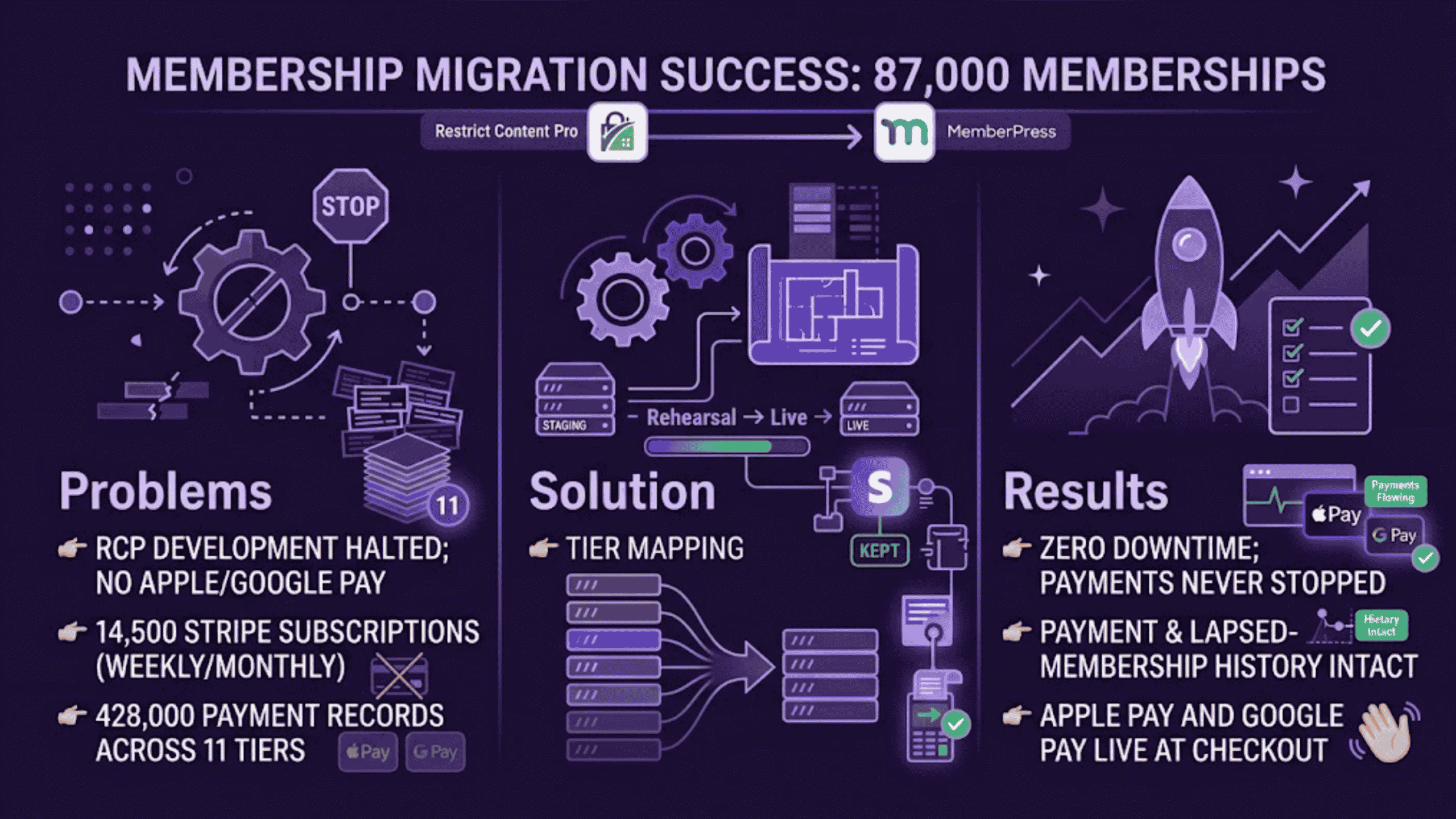
This membership business needed to move 87,000 memberships, roughly 428,000 payment records and about 14,500 live Stripe subscriptions off Restrict Content Pro and onto MemberPress, across a database of some 99,000 registered users. MemberFix planned and ran the membership migration against the live database, so members could keep buying and Stripe kept processing renewals throughout.
We've kept this case study anonymous at the client's request.
The Situation
The business sells printable craft and activity packs for kids. For a weekly or monthly subscription, members download whatever they want from a library that keeps growing with new packs. Restrict Content Pro decided who could download what, and Stripe handled the money. That setup had worked for years.
The Problem
Restrict Content Pro changed hands in 2020. Since the start of 2025 its updates have been almost entirely bug fixes, security patches and licensing changes, and in May 2026 its owner stopped selling it as a standalone product and folded it into Kadence. Every membership, every payment and every protected file on the client's site depended on that plugin.
The owner also wanted Apple Pay and Google Pay at the checkout, which his Restrict Content Pro setup could only offer with custom code.
“Part of my problem with RCP throughout the years was that it was a niche plugin … I can't integrate with like industry standard stuff that the other plugins had. Case in point, Google Pay and Apple Pay, which is like so basic in 2026, and I just didn't have it without you custom coding things.”
– The site owner
What made the decision hard was not the cost of the new tooling. He was explicit about that. It was the size of what he was about to move: “I'm just trying to put my mind at ease because it's a big, it's a big switch.”
The Decision
Which platform
The owner had looked at membership plugins before and wanted to check his thinking before committing, so he asked whether a WooCommerce-based setup would do the job instead. Risto Karaivanov and Trim Qemali from MemberFix walked him through it, and the answer came down to which machine charges the card.
Restrict Content Pro and MemberPress both leave recurring billing to Stripe. Stripe charges the card on schedule and tells the site what happened. A WooCommerce Subscriptions setup works the other way around: the site itself has to remember to trigger each renewal, using timed background tasks on the server.
“And the issue with using WooCommerce subscription is that everything relies on cronjobs on your server. So in case cronjobs doesn't work, that means that the subscription will not get renewed and you will have issues.”
– Trim Qemali, MemberFix
That difference decides who notices a problem first. With Stripe running the billing, a failed charge is Stripe's to retry and report. With the site running it, a renewal can simply never happen, and nobody finds out until a member asks why they were never billed.
So the move to MemberPress changed the plugin that manages the memberships and left the machine that charges the cards untouched. The riskiest part of the site stayed exactly as it was.
Staging cutover, or migrate the live site
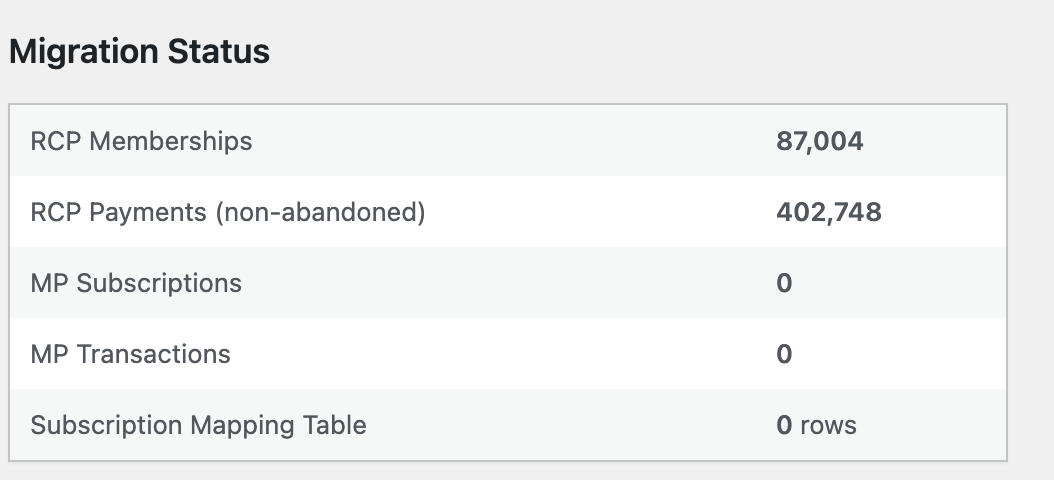
At the time of the migration the site carried 87,000 memberships across 11 tiers and roughly 428,000 payment records going back years. Of those memberships, about 14,500 were live subscriptions still billing in Stripe. Renewals arrive “almost every minute, give or take” according to the site owner.
A standard migration follows a fixed sequence. Export the data, close the site for maintenance, import everything into the new system, reopen. On a smaller site, nobody would think twice about it.
Run that sequence on a site this size and it plays out like this: Stripe keeps charging cards while the site is shut, and every one of those payments lands with the new system knowing nothing about it. Afterwards, someone has to find each one and match it to the right member by hand. Miss one, and a member pays for a month they cannot log into. Miss another, and their account shows a plan they never bought.
You can size that risk for your own site: take how many renewals Stripe charges you in an average hour, and multiply by the hours a migration would keep you closed. That is how many payments someone would be matching up by hand afterwards, and every one of them is a member who has paid you and might not be able to get in.
For this site, that number ruled out closing the site while the data moved. So the team started with the conservative approach: keep the data work off the live site. Everything would be built and rehearsed on a staging copy first, so the site only had to close for the switch itself, and the only catch-up work was whatever memberships arrived during it. The owner guessed that would mean three, five, maybe ten members.
A week in, Trim Qemali, who led the migration, proposed something bolder. Install MemberPress on the live site, but keep Restrict Content Pro in charge of the site, so nothing changed for members. Connect it to Stripe straight away, so every renewal was recorded in both systems at once. Finish and test the migration tool. Then execute it against the live database with the site open and taking payments.
Done that way, there is no gap for a payment to fall into: whatever happens on Stripe is recorded in MemberPress from the first day it is connected, so the live run has nothing to catch up.
The owner agreed, and that is how it ran.
How We Migrated From Restrict Content Pro to MemberPress
Nothing touched the live site until the whole process had been rehearsed on a staging copy hosted on Kinsta: the migration was executed there repeatedly, and the output was reviewed after every pass, including the passes that came back clean.
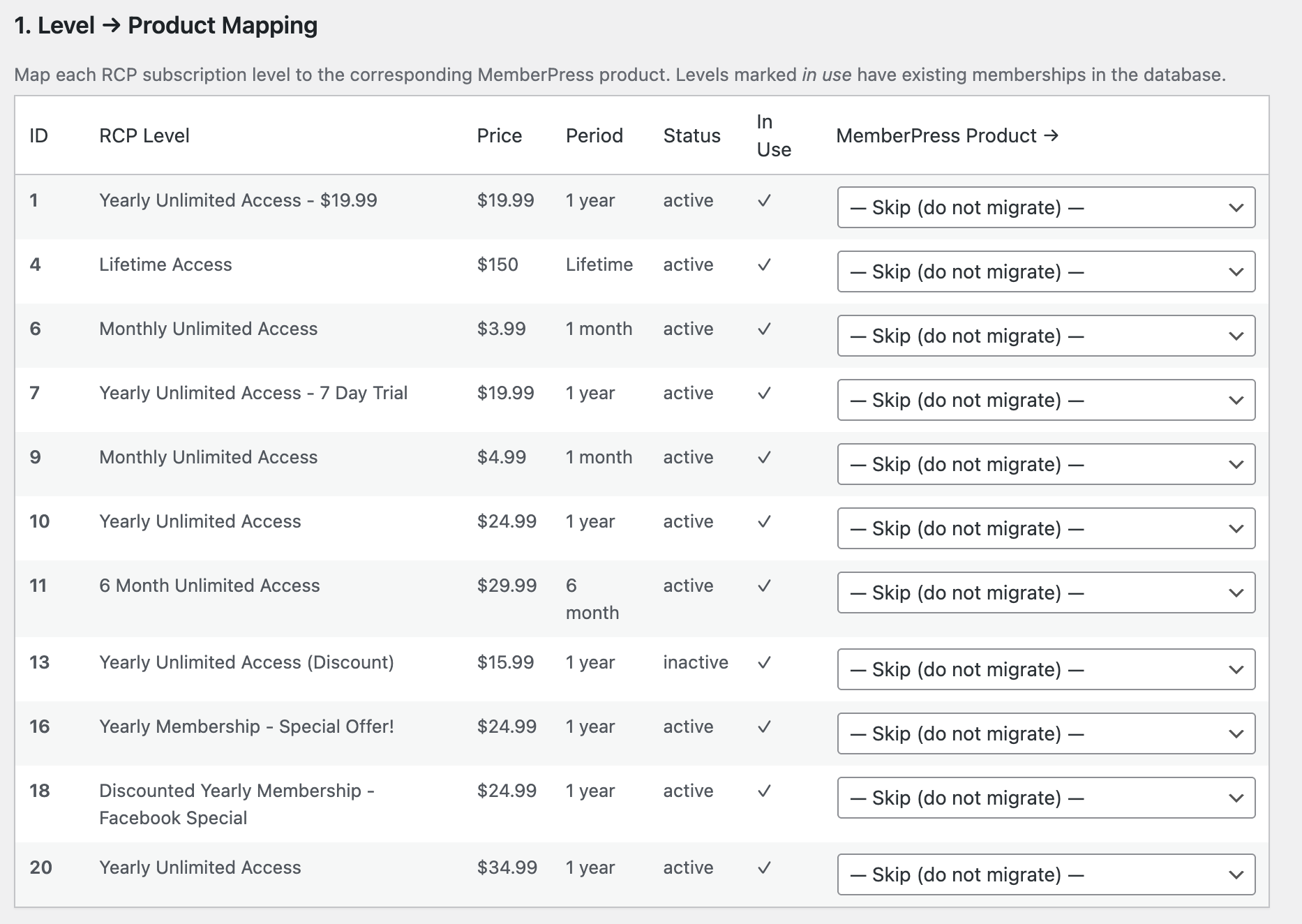
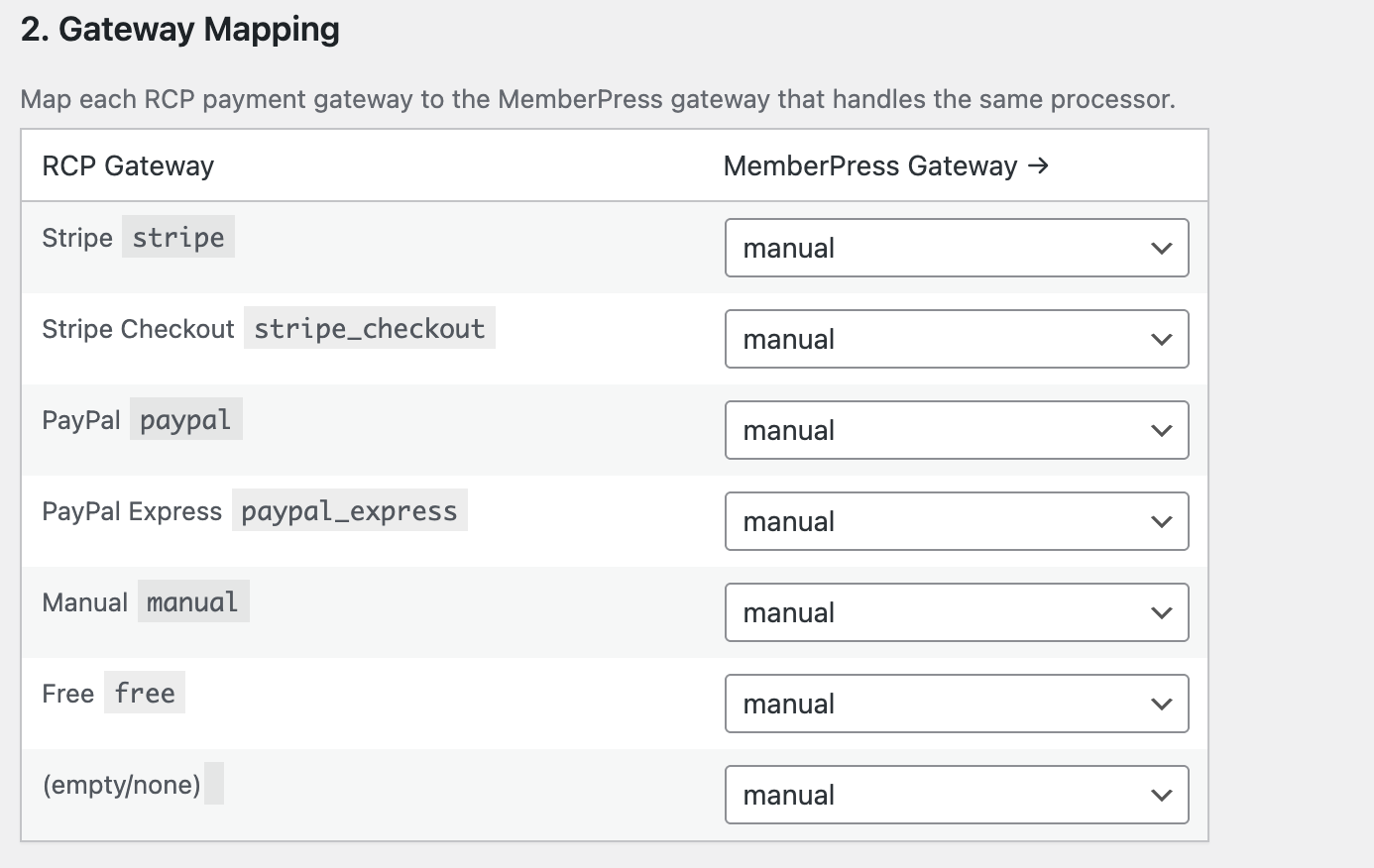
A tool built for this site, not a one-off script. A generic import was ruled out on two counts. Restrict Content Pro and MemberPress record time differently, so every historical payment had to be converted during the transfer. And staging and the live site number their records differently, so tier mappings that were correct in rehearsal would have been wrong in production. Trim built a small plugin with a mapping screen instead: each Restrict Content Pro tier was matched to its MemberPress equivalent before the run began, so nobody was editing ID numbers on the day.
The migration itself ran in three phases.
1. Memberships moved with their billing intact. Every membership was recreated in MemberPress with its Stripe customer and subscription records still attached, so billing continued against the same card on the same schedule. No member had to re-enter payment details or confirm anything.
2. Payment history came too, active or not. Roughly 428,000 payment records came across, including those of members who had already left. Anyone who had canceled or lapsed kept their transactions and membership details, so a returning member resubscribes with everything already on file.
3. Access rules went last. The rules deciding who can see what were mapped over to MemberPress, and the protection code inside every WooCommerce product was swapped in one pass instead of one product at a time.
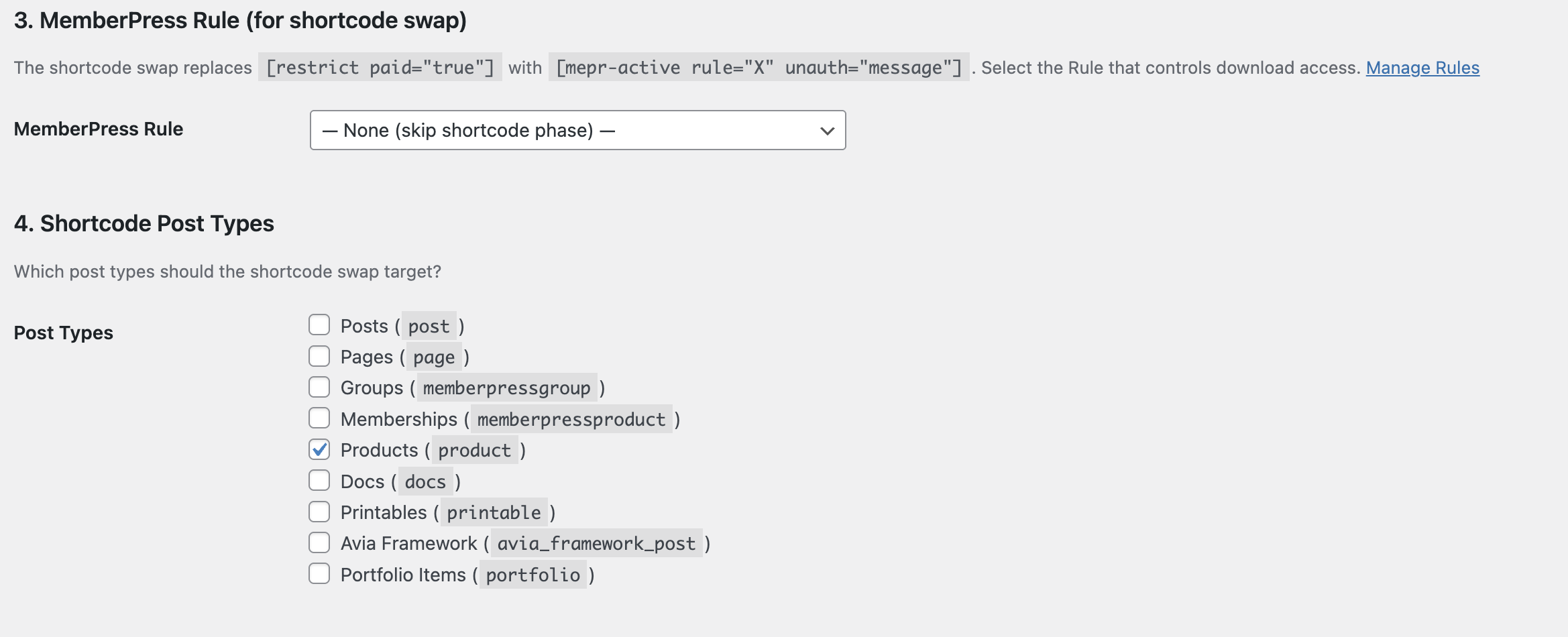
That last phase included a design choice aimed past the migration itself. Every product points at a single protection rule rather than naming a membership tier directly, so adding a tier now means editing one rule instead of every product.
Sequence was part of the design: all the data was in place before the access rules switched over, which minimized the chance of a logged-in member finding their content missing.
The owner spent the staging period making his own changes: reworking how content blocking behaved, rebuilding his account and membership pages, restoring a separate thank-you page for each tier so his GA4 tracking kept working, and cutting the automated emails down to the three he wanted members to receive: welcome, cancellation, failed payment. None of it had to be redone after the switch.
Once the migration finished, two small changes were left: pointing the account page and the login page at their MemberPress versions, a job of two or three minutes. The team then worked through the site as members, using a plugin that shows exactly what a member sees, checking subscriptions, access, payment history and protected content across the tiers. Apple Pay and Google Pay were switched on and tested with live payments.
What We Did About the PDF Library
One job remained after the migration. The PDFs are the product on this site, so the whole library had to stay members-only. MemberPress protects files by having the web server check each download request before releasing the file, but Kinsta runs NGINX, which handles that check differently, and the standard approach did not fit. Without protection, anyone with a direct link could have downloaded the files members pay for.
MemberFix built the missing piece: a small proxy plugin. Kinsta now routes every request for a protected PDF through it, and the plugin runs three checks before releasing a file: the visitor is logged in, their subscription is active, and they are entitled to that particular file. Fail any check and the request is refused.
The Results
87,000 memberships moved, one manual fix. Every membership arrived in MemberPress with its Stripe customer and card still attached, all 14,500 live subscriptions kept billing on their existing schedules. Exactly one account needed attention: a registration that came in while subscriptions were being converted. The team identified and handled it, and the client saw no disruption. Under the original staging-cutover plan, the owner's own estimate had been three, five, maybe ten of those.
The site never closed. No maintenance mode, no planned downtime, and Stripe processed payments for the full duration of the migration.
428,000 payment records came across, including those of lapsed members, so a returning member's history is already in MemberPress when they resubscribe.
The members-only PDF library stayed protected. The standard MemberPress file protection does not work on this site's hosting, so MemberFix built a proxy plugin that checks every download against login, subscription status and entitlement before releasing a file.
Apple Pay and Google Pay went live at checkout, both enabled and tested with live payments. Google Pay was already processing real customer transactions on day one.
25 to 30 development hours against an estimate of 40 to 60, with go-live three weeks after kickoff.
The site owner
The Takeaway
The hardest part of a migration at scale is not moving the data. It is moving the data while the business keeps running: members signing up, renewals charging, content staying available, and nothing allowed to fall between the old system and the new one. That is what this migration was designed around, and three lessons from it are worth carrying to any large membership site.
A small membership site can afford a maintenance window: if something breaks, it gets fixed before anyone notices. A site with tens of thousands of members renewing at all hours cannot. Its migration has to work with the site open, and the plan has to fit the site, not the other way around.
Sometimes that means a migration tool written for your database instead of a generic import. Sometimes it means building a plugin because your hosting breaks the standard feature. On a project of this size, expect part of the solution to be built for you rather than installed off the shelf.
And something always goes wrong on work like this. What separates a smooth project from a painful one is the team behind it: how carefully they prepare, rehearsing and reviewing every point of failure they can find, and how quickly they fix the one that gets through anyway. When the site is your income, that matters more than anything in the project plan.
Common questions about moving from Restrict Content Pro to MemberPress
Can you migrate a large membership site without taking it offline?
Yes. Here MemberPress was installed on the live site while Restrict Content Pro kept running it, and connected to Stripe straight away, so every renewal was recorded in both systems. The migration then ran against the live database with the site open and taking payments.
Do members have to re-enter their payment details?
No. Every membership was recreated in MemberPress with its Stripe customer and subscription still attached, so all 14,500 live subscriptions kept billing on their existing schedules.
What happens to past payments and lapsed members?
They move too. Roughly 428,000 payment records came across, including those of members who had already left, so a returning member's history is already there when they resubscribe.
How long did the migration take?
Three weeks from kickoff to go-live, and 25 to 30 development hours against an estimate of 40 to 60.
Does MemberPress file protection work on NGINX hosting like Kinsta?
Not with the standard setup, because it relies on the web server checking each download, and NGINX handles that check differently. We built a small proxy plugin that checks login, subscription status and entitlement before releasing each protected PDF.
Running a mission-critical membership site on a stack that no longer serves you?
Talk to us about your setup, and whether migration is the right move
 Reviewed by Vic Dorfman, founder of MemberFix, a WordPress membership expert with 10+ years building, fixing, and scaling membership sites.
Last reviewed October 2026.