




Your Uncommonly Amazing WordPress Tech Partner
For e-learning businesses that outgrew their platform

Custom LMS Development on WordPress

Your LMS does most of the job. Then the business needs something it can't do. We extend LearnDash with custom plugins, and we'll say so when a SaaS LMS or a from-scratch build is the better call.

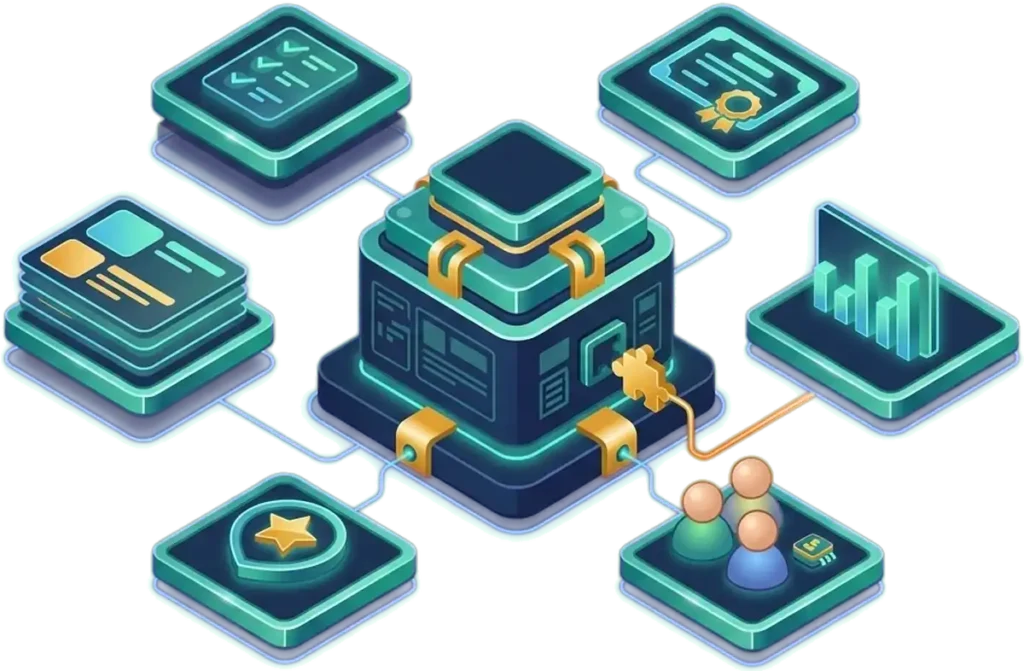
Isometric diagram of a learning platform with course, quiz, certificate, reporting and group tiles connected to a central hub, with one custom plugin piece snapping in.
As seen on
LearnDash logo
Membership Geeks logo
WP Fusion logo
MemberPress logo
MemberMouse logo
Membership Academy logo

What custom LMS development means when you already have learners

For the established businesses we work with, custom LMS development usually means extending a platform that already has courses, quizzes, certificates and groups, and writing the parts that make your business different as custom code. On WordPress, that is LearnDash plus custom plugins.

Teams searching for an LMS development company or LMS development services usually choose between three routes: stay on a SaaS LMS, build software from scratch, or build on WordPress. Each wins in some situations, including some where we are not your answer.

Our work is for businesses that are already running. You have learners and revenue, and a platform that has started to get in the way. Tell us what it can’t do, and we’ll tell you which route fits.

Who this is for, and who it isn't

A good fit if

Not a fit if

SaaS LMS, from-scratch software or WordPress: how the three compare

This is our own view, based on the projects we take on, except where a source is named.

Three routes to a custom LMS, side by side
TopicSaaS LMSFrom-scratch custom softwareWordPress + LearnDash + custom plugins
Best fitStandard courses, a small team, no unusual rules.An LMS that is itself your software product at very large scale, a mobile-first product, or one built around specialized engines like proctoring.Established course, membership and CE businesses with specific rules who want to own the platform.
Time to launchUsually fastest when configuring is enough.Usually more engineering work. Timing depends on the scope and how much existing software you can reuse.In between. Courses, quizzes, groups and reporting already exist, so the work goes into what is specific to you. Timing still depends on scope.
Who owns the dataIt lives on the vendor's platform. Check the contract and export documentation.Depends on your contracts, hosting and any third-party services.You keep everything if you leave us, and our hosting is optional.
How far it bendsAs far as the vendor's settings, integrations and API allow.The limits are your architecture, budget and ability to maintain it.Far for most business rules. LearnDash documents hooks and a REST API that custom code can use.
What drives costThe vendor's plan terms. Read how the price changes as your enrollment grows.In our view, mostly engineering: the build, and the people who maintain it.LearnDash is a flat annual license with no per-student fees (LearnDash pricing page), plus hosting and the custom work.
Who maintains itThe vendor maintains the core product. Ask who owns your configuration and integrations.Your engineers, or the studio that built it.You, or a team like ours. After launch, that can be Managed TechOps.

If your rules are standard, rent a SaaS LMS. If the LMS is your product, or a native app or a specialized engine is central to it, weigh a from-scratch build. If you are an established business with rules of your own and you want to own the result, we think WordPress is usually the shorter path.

What we build on top of the LMS

The platform underneath is usually LearnDash. For how we work with it, see our LearnDash development page. This is what we add when off-the-shelf stops short.
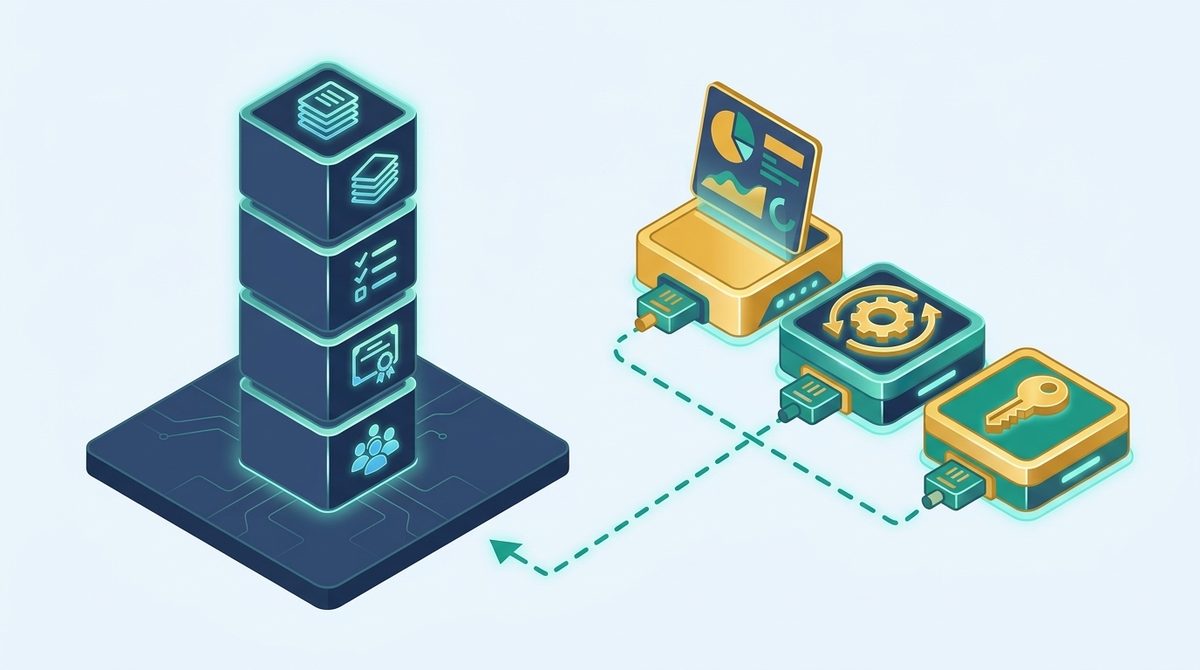
Standard course, quiz, certificate and group blocks on one platform, with custom reporting, enrollment automation and single sign-on pieces plugged in.
Left: what LearnDash gives you out of the box. Right: the custom pieces we add: reporting, enrollment automation and single sign-on.

Custom reporting and analytics dashboards

Reports built around what your team needs to see, such as who finished, who stalled and what a learner still needs.

Enrollment automation

Enrollments happen without a staff member doing each one by hand. See how we did it for Realtime Voice Training.

Multi-instructor setups

Several instructors teaching on one site, set up the way your program is run.

Gamification

Progress mechanics built around how your learners move through a program.

Integrations and single sign-on

Your LMS connected to the other tools you run, and to institutional logins such as OpenAthens.

Group seats and team accounts

LearnDash's Elite plan lists group course management and seat selling. For requirements beyond that, we can scope custom plugin work.

Plugins you can reuse or sell

A plugin we build for you can run on more than one of your sites, and we build plugins that clients sell. See WordPress plugin development services.

What this looked like for three clients

Realtime Voice Training: enrollment automation

71 enrollments in one month processed automatically; each used to take 15 to 20 minutes by hand.

“It's ungodly if I'd had to do it myself.”

Charlene Hansard, Realtime Voice TrainingRead the Realtime Voice Training story

Free Movement: university single sign-on

University single sign-on (OpenAthens) live in under two months. The case study reports that OpenAthens said such projects typically take under a year.

Read the Free Movement case study
Founded in 2014, and trusted by 100+ membership sites.
Memberium Certified Agency Partner badge
MemberPress Certified Developer badge
Keap Certified Partner Badge

How a custom LMS project runs

Step 1
Tell us what the platform can't do

Use the form below. If you’re on a SaaS LMS, tell us what it won’t do and what you’ve tried. If you’re on WordPress already, tell us what the site can’t handle.

Step 2
A plan on the tools you already own

We audit what you have first. A paid audit, from $1,000, is available when you want a deeper technical look. The plan that follows is in plain English and builds on the tools you already own. If the right answer is a SaaS tool or a from-scratch build, we say so.

Step 3
Build, test and migrate

Before launch, QA covers plugin conflicts, security, user experience, functionality and performance. If you’re leaving another platform, our migrations start from $3,000, and the custom LMS work is scoped on top after we’ve heard what you need.

Step 4
Look after it

Afterward you can keep us on through Managed TechOps: one team for development, support, hosting, troubleshooting and planning, month to month. You keep everything if you leave.

We don’t publish LMS prices, because two builds are rarely alike. Custom LMS work is scoped after we’ve heard what you need. Learner types, pricing rules, the systems it must connect to, the data we’re moving and the reporting you want all change the scope. We’ll tell you what your project would take before any building begins.

SOME OF THE AWESOME FOLKS WE’VE WORKED WITH
ProcessDriven logo
Paul Wilson Golf logo
Splasheo logo
Nomad Capitalist logo
Echelon Front logo
AuthorityHacker logo
Custom LMS development

Tell us what your current platform can't do.

Describe your learners, what you sell and where the platform gets in the way. A technical team member will tell you what we'd do, and whether WordPress is the right fit at all.

✓ Book a chat, or just get a reply within one business day
✓ Talk to an expert who helps first, not a hard sell
✓ Trusted by 100+ membership sites
Trusted by teams using
LearnDash MemberPress WP Fusion WooCommerce BuddyBoss Paid Memberships Pro FunnelKit GamiPress Gravity Forms

Custom LMS development FAQ

How much does custom LMS development cost?

It depends on your learner types, pricing rules, integrations, data to move and reporting. We don’t publish LMS prices, and we won’t guess before we’ve heard what you need. On WordPress the LearnDash license is a flat annual fee with no per-student fees, so the rest is the custom work, hosting and upkeep. In our view, a from-scratch build is mostly engineering and ongoing maintenance.

Is WordPress a real option for a custom LMS, or only for small course sites?

It is a real option for established course, membership and CE businesses. We can’t give you a universal ceiling, so we check performance as part of pre-launch QA. If your plan needs a bespoke architecture for a very large audience, a from-scratch build may be the better call and we’ll say so.

Can you move us off our SaaS LMS without losing learner records?

It depends on what the vendor lets you export. Platforms differ in how much of your learner, enrollment and completion data they hand over. We check that before we plan the migration, and we tell you what can and can’t come across. See our membership migration page.

When should we build from scratch instead?

When the LMS is the product you sell to other businesses, when a native mobile app comes first, or when proctoring or adaptive learning is central to what you sell. In those cases we’d weigh a purpose-built system, and we’ll say so.

Can we keep our existing SCORM or xAPI content?

Possibly. According to their product pages, Tin Canny tracks SCORM and xAPI data inside WordPress, and GrassBlade lets you upload and host SCORM and xAPI content on a WordPress site. We check your content against the add-on before promising anything.

Who looks after it after launch, and do we own it?

After launch, Managed TechOps covers development, support, hosting, troubleshooting and planning, month to month. You keep everything if you leave. For associations offering CE, see also our association website design work.

Vic DorfmanWritten and reviewed by Vic Dorfman, founder of MemberFix. MemberFix was founded in 2014 and is the WordPress tech team for membership, e-learning and association businesses. Last reviewed: October 2026.