
Introduction
WordPress can get complicated if you're using it to sell and deliver your online course.
For that reason, you may have decided to use Teachable instead. And for payment processing, you're probably using Stripe in conjunction with Clickfunnels or some other 3rd party shopping cart platform.
There's just one problem: how do you cancel a member's access automatically when they cancel their subscription or ask for a refund?
We can do that using Zapier and Stripe Webhooks in a ‘custom Zap'!
Setup steps
There are four main steps to this process:
A) Set up the first step of the Zap
B) Create the Stripe Webhook
C) Trigger an event for the Webhook
D) Complete the last step of the Zap
Set up the first step of the Zap
1 – First of all we need a Zapier account.
You need your own Zapier account for this. Paid plans start at $19.99/month billed annually (Professional), or $29.99/month billed monthly.
2 – When you are logged into Zapier you need to press “Make a Zap!”

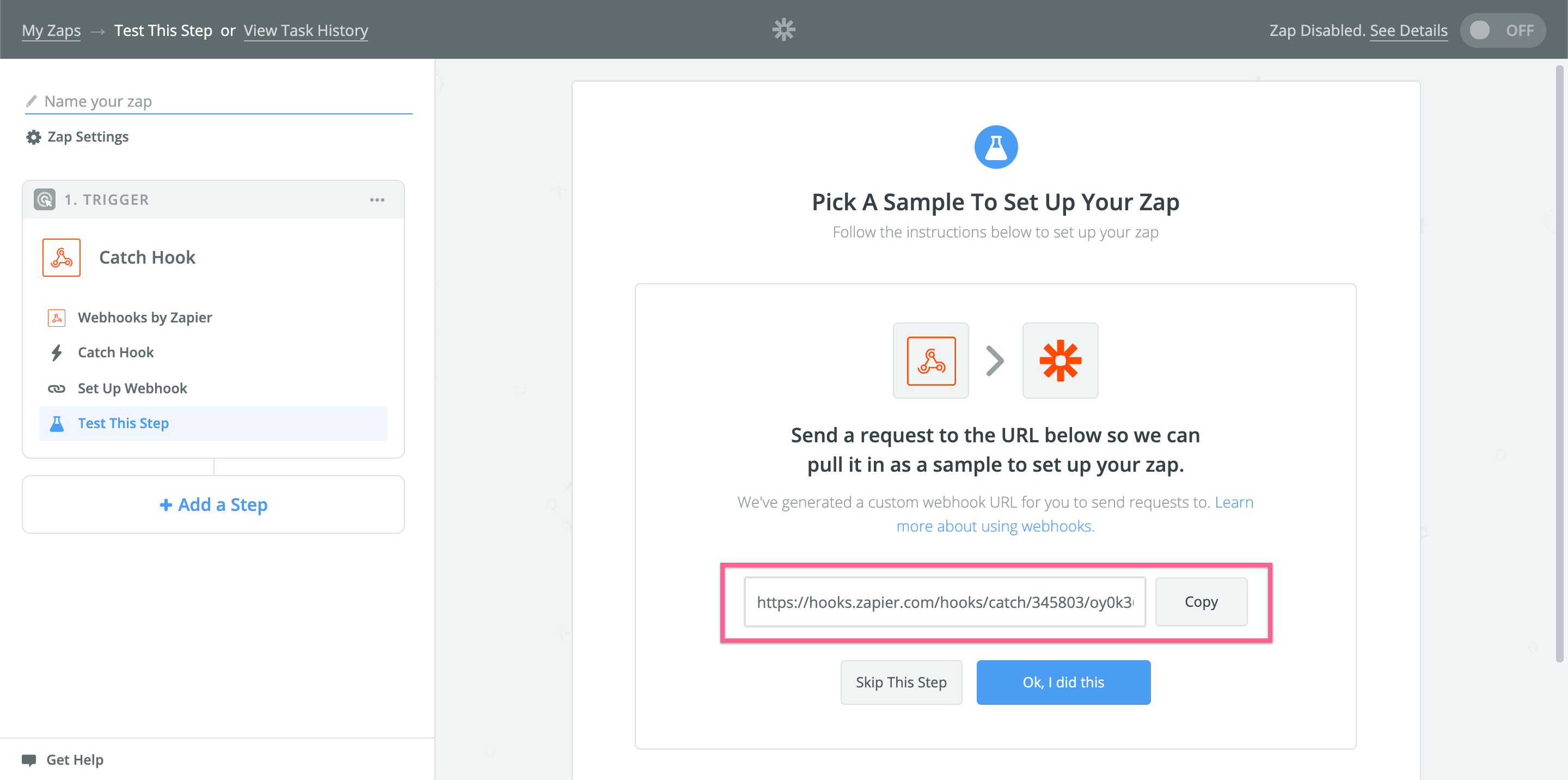
3 – When the search input shows up, you need to type in “Webhooks” and then click on “Webhooks by Zapier”.

4 – We need to select “Catch Hook”

5 – Now you should see your webhook link. Copy that link to your clipboard.
Create the Stripe Webhook
1 – In your Stripe Dashboard, open the “Webhooks” tab in Workbench.
2 – Click “Create an event destination” and select “Your account”.
3 – Choose the “Snapshot” payload format and select the API version. Snapshot sends the full Event object, which this Zap needs to read the customer's email. Then select the events listed in the note below.
4 – Click “Continue”, select “Webhook endpoint” as the destination type, click “Continue” again, and paste the link you copied from Zapier as the “Endpoint URL”.
Note: Please pay attention to the events!
The correct events in this case are “charge.refunded” and “customer.subscription.deleted“. These events represent refunds and cancellations, respectively.
Trigger an event for the webhook
Note: Here I can't really give you a guide.
You have to buy your subscription and then either refund yourself or cancel your subscription.
But I've added it as one of the higher steps because it's crucial for our task. Otherwise you won't have any data for Zapier to pull from the Webhook and you won't be able to finish your Zap.
Complete the last step of the Zap
1 – Add a new step to your Zap.

2 – Pick “Action/Search” from the list.

3 – In the search input type “Teachable”.

4 – Select “show less common options”.

5 – Select “Unenroll Student From Course”

6 – Connect to your Teachable account

After clicking that button you'll see a new browser window:

Fill the form and hit “Yes, Continue”.
7 – After the connection click “Save & Continue”.

8 – Before filling the Teachable user data form, let's find your user. To do that, click “Add a Search Step”.

After pressing the button a pop-up should appear. There you will need to confirm that you want to add a new step to your Zap.

9 – Now fill in the email field. Do that by pressing on the list button.

10 – From the list select “Data Object Metadata Email”.

11 – Hit “Save & Continue”.
12 – Get back to the 3rd step of the Zap and fill out the form by selecting the course that you want to remove the user from.

13 – Activate your zap.
All done!
If you're still deciding between Teachable and WordPress, we compared Teachable, Kajabi and the WordPress LMS plugins.
Now let's hear from you!
What kind of learning material are you selling with Teachable?
Tell us in the comments section below.




2 Responses
Hey Sorin, I came to this article while trying to configure Stripe as a Gateway to handle Teachable subscriptions.
Do you know a way to configure a Zapier from Stripe to Teachable in order to automatically enroll a User into teachable when a specific Product on Stripe has been purchased?
Thanks!
Hi Simon,
So you are trying to create users in Teachable based on Stripe purchases?
To do that you have to configure Webhooks from Stripe to Zapier and then add the new user based on those webhooks.
Please let me know if that answered your question.
Cheers!