
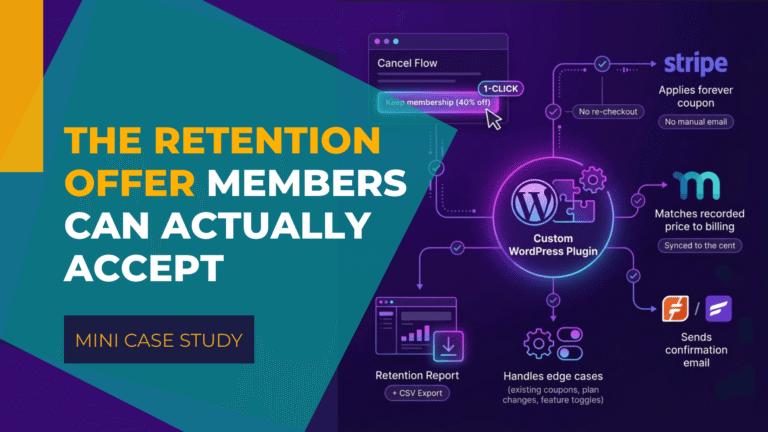
At a glance
Who: A follow-along fitness membership with monthly, quarterly and yearly plans.
Problem: Members who canceled over price could be offered a 40% retention discount, but accepting it took real effort. Monthly and quarterly members had to go through a brand-new checkout to buy again at the lower price, and yearly members had to email the founder, who applied a Stripe coupon to their account by hand. There was no single place to see which members were on a discount.
Result: Members who were one click from leaving can now stay at a price they can afford, and staying is easier than canceling. The founder no longer touches a single discount, and when a member writes in about their bill, the answer is one report away instead of a search through two systems. The first member through the flow, on a yearly plan, kept their subscription at $575.40 instead of canceling.
Scope: A standalone WordPress plugin that connects the client's own cancellation flow to Stripe and MemberPress, plus a Retention Discounts report with CSV export and a FluentCRM confirmation email through WP Fusion. Built and tested on a staging site wired to Stripe's test mode before going live.
An online fitness membership was offering a retention discount that only worked if a member was willing to go through a new checkout or wait for an email reply. MemberFix built an automated MemberPress cancellation discount that applies in one click, as a custom MemberPress development project.
🌐 We've kept this case study anonymous at the client's request.
The client sells memberships on three plans: monthly, quarterly and yearly. Their team had already built their own cancellation flow as a plugin: a modal that asks members why they are leaving and tracks who ends up staying.
One of those answers was price, and the client had a theory about it:
“price is prohibitive for some people. So I think this will either confirm or deny that theory that we have listening to people.”
The client
So when a member said the membership cost too much, the flow offered 40% off, for good. The offer was right. Delivering it was the problem.
The Problem
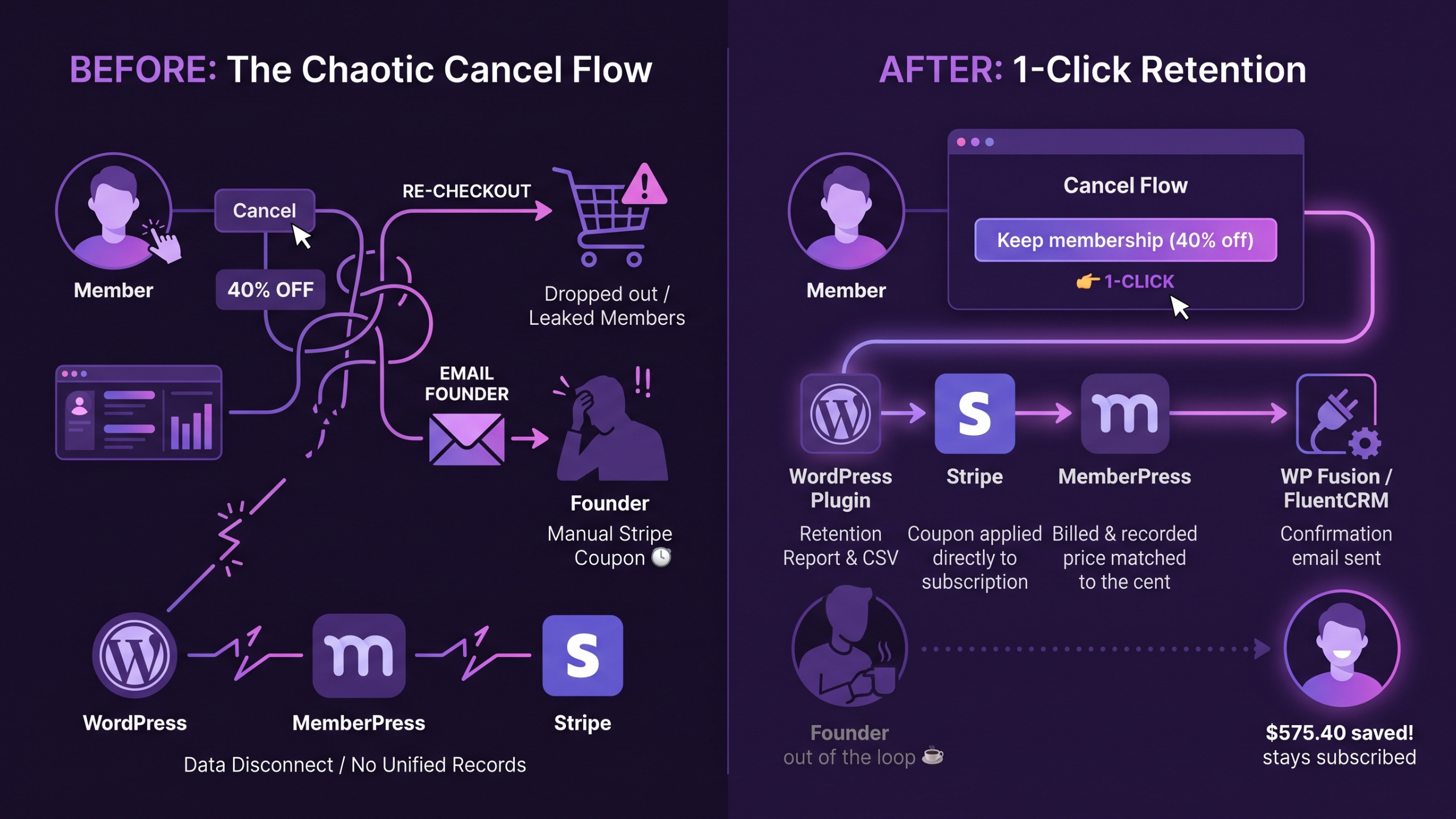
MemberPress has coupons, but a MemberPress coupon can only be used at checkout. It cannot be applied to a subscription that already exists. So the discount reached members in two different ways, depending on their plan.
- Monthly and quarterly members were sent through a brand-new checkout to buy the membership again at the discounted price.
- Yearly members had to email the founder, who then applied a Stripe coupon to their subscription by hand.
Both routes asked for extra effort at the exact moment a member had already decided to leave. A new checkout means re-entering details and trusting that the old subscription will be handled correctly. An email means waiting. A member who is one click from canceling has no reason to do either, so some of them canceled instead.
The yearly discounts, the most valuable ones, all went through the founder's inbox.
And there was no record anyone could check. Discounts applied directly in Stripe did not exist in MemberPress, so there was no single place to see who was paying what. For the client, that was the requirement that mattered most:
“…but then if something ever happens or if a member has a question, it's a labyrinth to try and figure out who's got what going on.”
The client
The client was also surprised the problem existed at all. A discount offered at cancellation is standard practice for subscription businesses, and they asked on the first call whether MemberPress had plans to build it in. As far as the MemberFix team knew, it did not, which made this a custom build.
The Decision
Which coupon does the work
There were two places a discount could live: MemberPress or Stripe.
A MemberPress coupon would have kept everything inside WordPress, but it brings back the problem the client was trying to remove. MemberPress applies coupons at checkout, so the member would still need to check out again. Dejan from MemberFix, who built the plugin, explained to the client that this was the deciding factor: a Stripe coupon can be attached to the member's existing subscription straight from their account, with no checkout and nothing for the member to do.
Stripe already charges the cards on this site and already holds every subscription. Putting the discount there means the system that bills the member is the system that knows about the discount.
That choice created a second job. Because the coupon lives in Stripe, MemberPress has no idea it exists. Left alone, MemberPress would keep recording the full price while Stripe charged the discounted one, which is exactly the labyrinth the client wanted to avoid. So the build had to keep the two systems in agreement on every renewal, not just on the day the discount was applied.
How long the discount lasts
The offer was 40% off for good, so the Stripe coupon was created with a duration of forever. The client wanted room to change that once they had seen how members responded, and asked what would happen to members who already had the discount if the terms changed later.
Changing the terms in Stripe creates a new coupon with a new ID. Members who already accepted the old one keep it. A member promised 40% off for good stays at 40% off for good, whatever the offer becomes for the next person.
How We Built the One-Click MemberPress Cancellation Discount
The client's cancellation flow stayed theirs. MemberFix built a separate, self-contained plugin that connects to it through the integration hooks the client's plugin already exposed, so none of their code was edited. When a member accepts the discount in the client's modal, our plugin does the rest.
What happens when a member clicks
- The coupon goes on the subscription they already have. The plugin makes a server-side call to Stripe and attaches the forever coupon to the member's current subscription. The current billing period stays at the price already paid, and the discount applies from the next renewal.
- MemberPress records the real price. The amount MemberPress shows for the subscription is updated to match what Stripe will actually bill: $70.20 a month, $178.80 a quarter or $575.40 a year.
- The member sees it straight away. A notice on their account confirms the discount and the new price. Nothing further is needed from them.
- The confirmation email goes out. A tag passes through WP Fusion into FluentCRM, which sends the member an email with their exact new price.
The discount percentage is read from the client's admin settings rather than written into the code, so changing it takes effect immediately. A guard stops anyone from taking the discount twice, which would otherwise have let a member cancel, accept 40% off, then cancel again for more. The offer does not apply to the entry-level plan.
Prices to the cent
40% off $117 is $70.20, not $70. MemberPress, the account notice and the email all showed the exact figure, but the client's offer modal said $70. Dejan raised it, and the client decided to show the exact amount everywhere.
Twenty cents is small, but a member who is told $70 and charged $70.20 has a reason to write in, and these are members who were already one click from leaving. The client took that change on in their own plugin: 40% off as the headline, the exact price underneath.
The edge cases
The core flow is short. Most of the engineering went into the cases around it.
- Members already on a recurring coupon. The plugin reads the true amount from Stripe's upcoming invoice before recording anything, so an existing discount is never counted twice.
- Members who change plans later. A member who moves from monthly to quarterly after taking the discount pays the full price of the new plan, and the old discount is hidden from their profile so it does not show a price they no longer pay.
- Switching the offer off. If the client disables the discount in their settings, members who already accepted it keep it. Ending one is a deliberate change made in Stripe and MemberPress, not a side effect of a settings toggle.
- The right Stripe account every time. The plugin detects whether the site is in test or live mode and uses the matching Stripe key, so a staging test can never charge a real card.
The Retention Discounts report
To answer the question of who has what, the plugin adds a Retention Discounts screen inside the client's own admin menu. It lists every member who has taken the discount, with their plan, the discount, the original price, when it was applied and the Stripe coupon behind it, and exports to CSV.
The client asked for two more columns once they saw it: the member's user ID and the MemberPress membership ID. They strip email addresses from exports and match members by ID instead, so both were added.
Testing before a single real member saw it
Nothing touched the live site until the whole flow had been proven on staging. Stripe's test mode had been sending its events to the production site, so the first step was to point them at staging instead. That gave staging a fully separate, fully working copy of the billing setup.
From there the team tested against a real renewal cycle rather than a single click, using Stripe test clocks to move subscriptions forward in time and confirm that each renewal billed the discounted amount and that MemberPress recorded the same figure. All three plans were checked. Then came a controlled live test on one isolated account before the offer opened to every member.
The Results
One click, every plan. Monthly, quarterly and yearly members all get the discount from the same button in the cancel screen, applied to the subscription they already have. No new checkout, no email to the founder, no waiting.
Recorded price matches billed price, to the cent. $117 becomes $70.20, $298 becomes $178.80, $959 becomes $575.40, and MemberPress, Stripe, the member's account and the confirmation email all show the same number on every renewal.
The founder is out of the loop. Yearly discounts no longer pass through the founder's inbox.
Every saved member is on record. The Retention Discounts report shows who took the offer, on which plan, at what price, with a CSV that matches the client's ID-based workflow. Before, this information did not exist in one place.
The first member stayed. Within days of go-live, a yearly member who had started to cancel took the offer and kept their plan at $575.40 instead of leaving. It confirms the flow works end to end with real money.
What the client said about working with us
“Communication is great with ClickUp. I think it's very easy to follow and see where the project is and easy to get ahold of the team.”
The client
The Takeaway
A retention offer only works if accepting it is easier than leaving. On this site the offer was always there; what stood between a member and staying was a new checkout or an email. Removing that step was the project.
The gap behind it is specific to MemberPress: its coupons belong to checkout, not to subscriptions that already exist. Working around that meant putting the discount in Stripe, which in turn meant keeping MemberPress in step with Stripe on every renewal. That second half is where a build like this succeeds or fails, because a discount that bills correctly but is recorded wrongly turns into a support question months later.
The client asked for one thing above everything else: when a member writes in about their bill, the answer should be easy to find. The report and the matched prices exist for that member, the one who has not written in yet.
Common questions about MemberPress cancellation discounts
Can MemberPress apply a coupon to an existing subscription?
Not natively. MemberPress coupons are applied at checkout. To discount a subscription that already exists, the coupon has to be applied in Stripe, and MemberPress has to be updated separately so its records match.
Does the member have to check out again to get the discount?
No. The discount is attached to the member's current Stripe subscription with one click from the cancel screen. Their card, plan and renewal date stay the same.
When does the discount start?
At the next renewal. The current billing period stays at the price the member already paid.
What happens if we change or switch off the offer later?
Members who already accepted it keep it. Changing the terms in Stripe creates a new coupon, and switching the feature off in settings only stops new members from seeing the offer.
How do we know who is on a discount?
The Retention Discounts report lists every member who took the offer, with plan, original price, discounted price, date and coupon, and exports to CSV with user and membership IDs.
Losing members at the cancel screen and not sure what MemberPress can do about it?
 Reviewed by Vic Dorfman, founder of MemberFix, a WordPress membership expert with 10+ years building, fixing, and scaling membership sites.
Last reviewed November 2026.