
MemberPress Checkout Limitations
MemberPress is one of the best WordPress membership plugins on the market.
As one of MemberPress’s qualified contractors, we literally work with it daily!
But while the MemberPress cart is great for most use cases right out of the box, it doesn’t offer native integration with some of the less common payment gateways that our customers use. One solution is to use a MemberPress Woocommerce integration plugin.
For non-Western businesses or high risk merchants (e.g adult, forex, gambling, etc.) that don’t have access to Stripe but still want to be able to use MemberPress, this is a big deal.
In these situations we generally recommend one of two options:
1 – Hire us to build a custom integration directly with MemberPress and your preferred payment processor (assuming the payment processor’s API is well developed enough to do so).
2 – OR, use WooCommerce to process your members’ payments and use MemberPress to serve protected content, manage members, etc. You can read our full WooCommerce review here.
Why Use WooCommerce With MemberPress?
Because you’ll be able to use pretty much any payment processor in existence!
You see, WooCommerce is the biggest shopping cart plugin in the WordPress ecosystem.
It has a huge number of extensions that includes a wide range of integrations with various payment processors outside of the standard options of Paypal, Stripe, Auth.net, etc.
So rather than hiring us to custom code an integration between MemberPress and your payment gateway, it’s often better (and cheaper) to “piggy back” on an existing integration that already works with WooCommerce.
Just Google, “WooCommerce” + “Your payment gateway”.
Chances are, somebody’s already developed an extension that allows you to accept payment with your preferred gateway.
How to Integrate MemberPress and WooCommerce
Using WooCommerce for your checkout and MemberPress for your membership creates a new problem: you have to keep the two apps in sync.
We ran into this situation so often that we decided to create a plugin that keeps your MemberPress data in sync with your WooCommerce data.
Our plugin solves this dilemma and liberates you from the constraints of MemberPress’s checkout system so that you get total control over your shopping cart experience, payment gateways, and funnels.
But you still get to use MemberPress’s awesome functionality for the membership side of things.
We have a bunch of customers using our plugin already and it works great.
Now it’s available to you. 🙂
Does MemberPress work with WooCommerce on its own?
Not for checkout. MemberPress’s own documentation says it has no built-in WooCommerce integration and points to third-party plugins for selling memberships through WooCommerce.
MemberPress documents an official Zapier-based WooCommerce integration on its Scale plan. It needs the paid WooCommerce Zapier plugin. Its WooCommerce page also lists third-party alternatives, including this plugin.
MemberPress lists this plugin as MemberPress WooCommerce 2-Way Sync, a third-party integration you buy separately. The listing links to this page for documentation and to MemberFix for support.
What Exactly Does Our MemberPress WooCommerce Plugin Do?
1 – It gives you the possibility to map WooCommerce products with MemberPress memberships
2 – It is using WooCommerce functionality to be notified whenever a new purchase has come through or a renewal payment has come through
3 – It creates the corresponding data in MemberPress to keep them both synchronized
4 – It makes sure that when a member is canceled in WooCommerce or MemberPress they will be canceled in both places
Important Note About Subscriptions
The plugin does not create or manage subscriptions on its own. If you want recurring billing and automatic renewals, you’ll also need the WooCommerce Subscriptions extension. Our plugin will then sync the subscription and renewal events from WooCommerce into MemberPress, ensuring both systems stay aligned.
Requirements
Installation
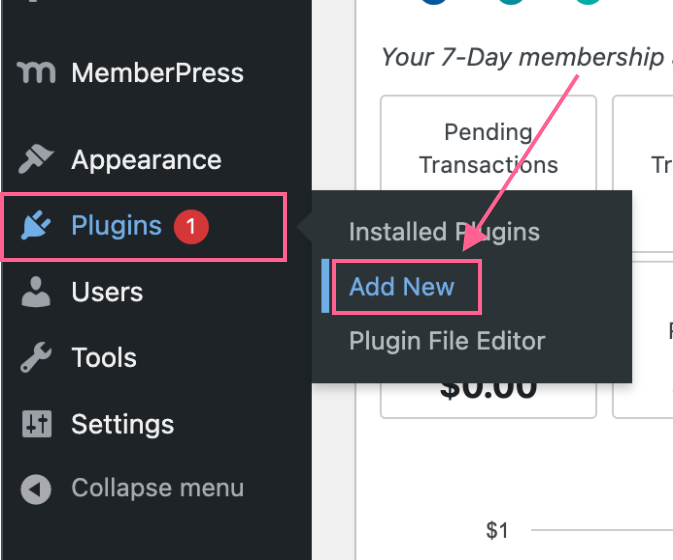
1 – Hover over the Plugins sidebar menu item and click on Add New
2 – Click on Upload Plugin

3 – Click on Choose file

4 – Click on Install Now

5 – Activate the plugin

Configuration
Watch the following video for a demo of how this plugin works:
1 – Hover over the WooCommerce menu item in the sidebar
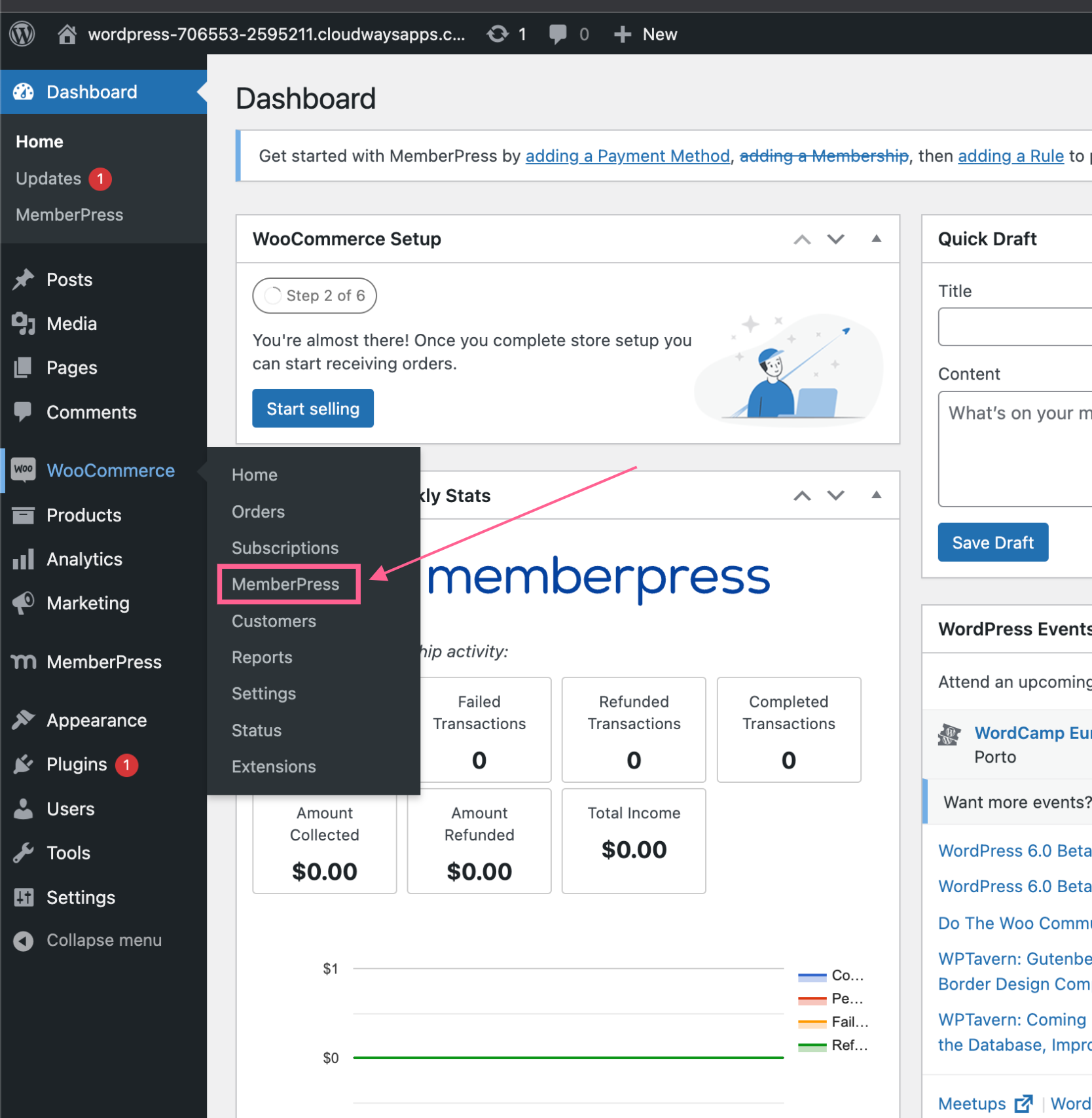
On that page you should see something like this:

On the left side, we have our WooCommerce products and on the right side, we have dropdowns that have the MemberPress memberships.
2 – Map your WooCommerce products to the MemberPress memberships

So that whenever there is a new purchase of a mapped product in WooCommerce it will create a new transaction in MemberPress.
Also, renewals will create new transactions whenever a WooCommerce renewal comes through.

Common questions about this plugin
Do I need WooCommerce Subscriptions?
For recurring billing, yes. The plugin does not create or manage subscriptions on its own. It syncs the subscription and renewal events from WooCommerce Subscriptions into MemberPress.
What happens when a member cancels?
A cancellation in WooCommerce or in MemberPress is carried over to the other, so both systems show the same status.
Who is this plugin for?
Businesses that want WooCommerce to handle checkout and MemberPress to handle memberships. That includes non-Western and high-risk merchants without access to Stripe, and anyone who wants control over their cart, payment gateways and funnels.
Who supports it?
MemberFix does, for as long as your license is active. Use the support form below.
Feature Requests and Support
If you have a feature request or would like to submit a support request just use the form below.

 Reviewed by the MemberFix team, led by Vic Dorfman, WordPress developers with 10+ years building, customizing, and migrating WordPress membership sites. Last reviewed: November 2026.