At a glance
Who: Court reporter certification prep platform. WordPress and LearnDash.
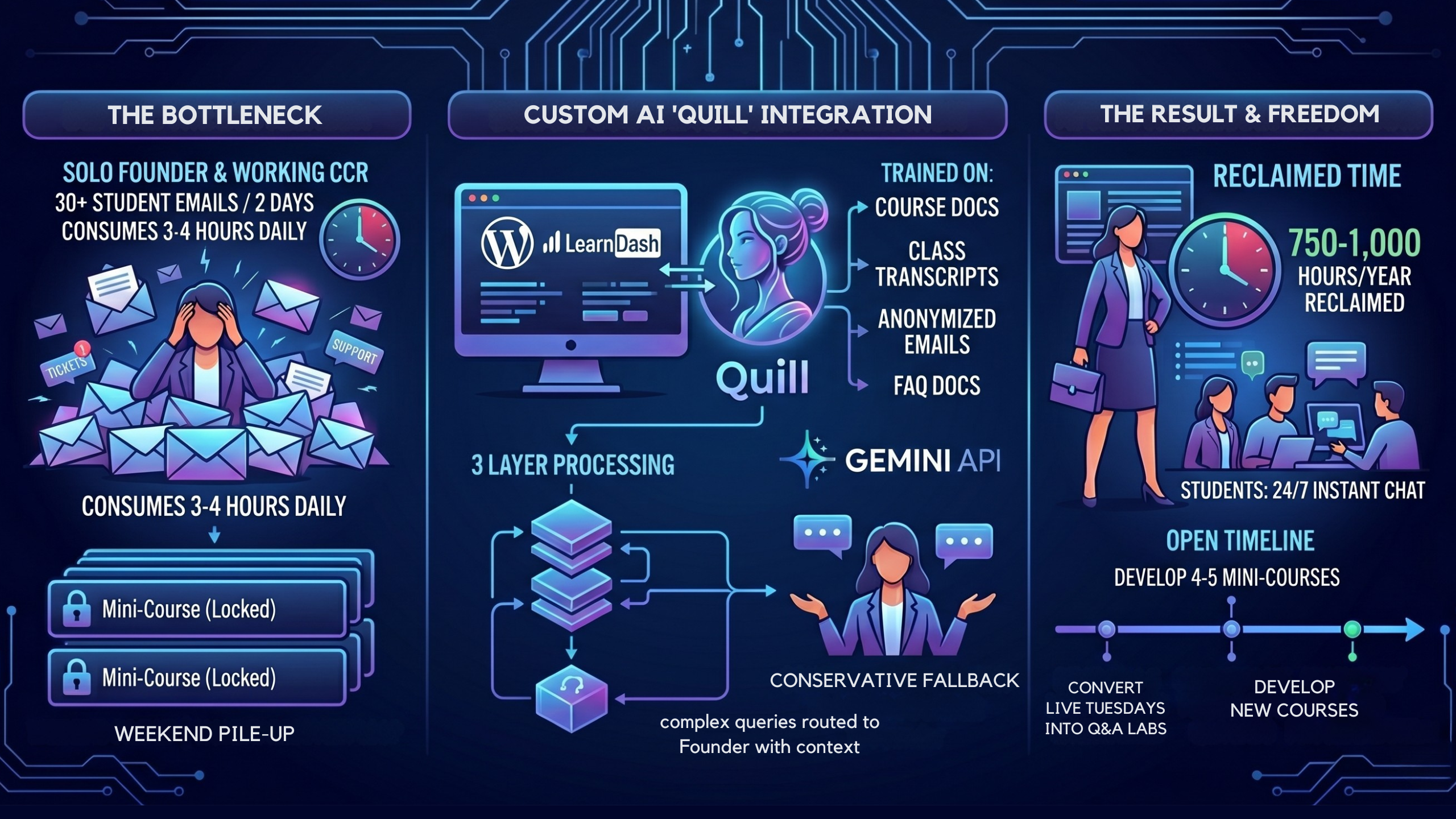
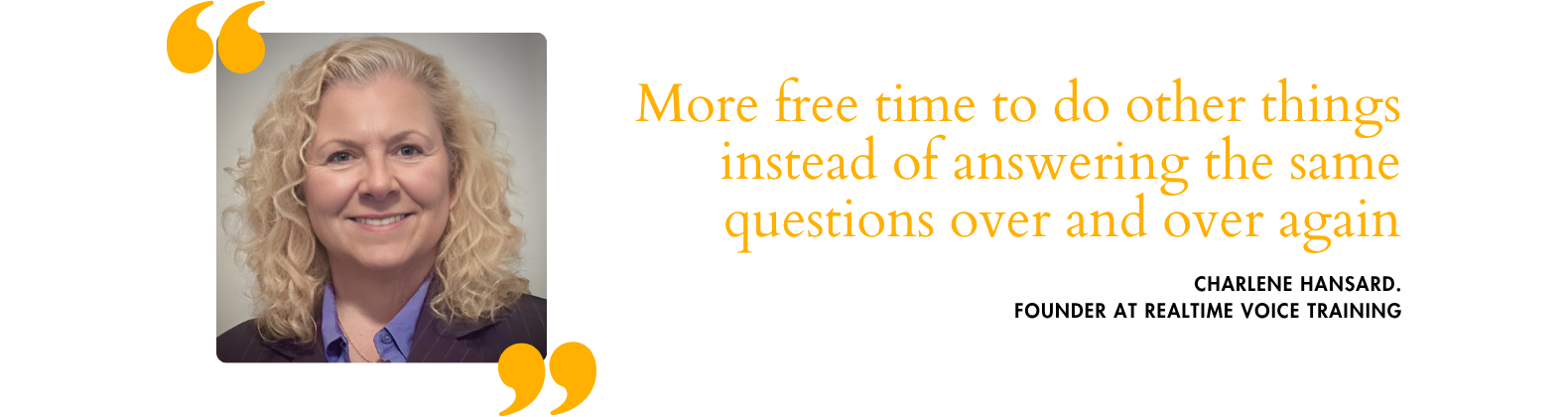
Problem: The founder answered every student email herself, 3 to 4 hours a day (roughly 750 to 1,000 hours a year), and enrollment growth kept adding to it.
Result: A custom AI assistant trained on the course handled 125 student messages from 37 students in its first week live. Four months in, members and site visitors have sent it 1,687 messages, and the founder says it has virtually solved the email support that used to take her 3 to 4 hours a day. Of 97 survey responses, 84 say they would recommend it.
Scope: Built on the existing stack, tested by the founder against real student questions before launch.
A vocational eLearning platform built by a working court reporter found that enrollment growth was turning the founder into a support desk. The fix was not hiring staff. It was building an AI chat assistant trained on the course itself.
This is one of the AI automations MemberFix can build for course businesses – a system that takes the repetitive load off the founder's plate.
🌐 Realtime Voice Training platform: realtimevoicetraining.com
The Situation
Realtime Voice Training prepares new voice court reporters for the NVRA certification exam. The program runs on live Tuesday classes, pre-recorded materials, and direct mentorship from Charlene Hansard – a Certified Court Reporter who has worked in the field since 2002 and still takes active freelance cases.
Students enroll in cohorts, progress through a structured curriculum, and prepare for a high-stakes certification exam that determines whether they can work in the field. For years, Charlene handled every aspect of student communication personally.
As enrollment grew – especially after a price deadline caused a pre-increase signup rush – the volume of student questions began to consume the teaching time that made the course worth taking.
It was a system that had served well for years – until enrollment growth made the manual approach unsustainable.
“It wasn't bad. It wasn't bad until I got more and more students.”
Charlene Hansard, Realtime Voice Training
The Challenge
Student questions at Realtime Voice Training followed a predictable pattern. Payment status. Course access. Lesson content. Schedule confirmations. Technical issues with dictation software and speech recognition engines. The same topics, asked repeatedly, by different students at different stages.
Charlene received approximately 30 student emails in a typical two-day period. During enrollment surges, that number climbed significantly higher – she had previously seen 60 to 100 per day when a pricing deadline caused students to lock in the old rate before the increase took effect. Answering them consumed 3 to 4 hours of her day – sometimes more.
The questions arrived at all hours. Some students expected answers on weekends. When questions piled up over Saturday and Sunday, Monday became an email recovery session.
The work was not complicated. It was cumulative. Each individual reply took only a few minutes. Multiply that across dozens of students, many asking variations of the same thing, and the total time added up to half her working day or more.
The cost was not just time. It was attention. Charlene had identified 4 to 5 additional mini-courses and webinars she could develop and sell separately. She wanted to redo her live classes as pre-recorded modules so Tuesday sessions could become Q&A labs instead of lectures. During a pulse call, our team member, Costinel, suggested an “On the Job” advanced course for graduates – something Charlene agreed would make sense if she had the bandwidth. None of it was happening.
The course content, the live instruction, the methodology – those were what students enrolled for. Every hour spent on repetitive email replies was an hour not spent on the work only she could do.
The Decision
Charlene had managed every aspect of student support on her own from the beginning. There was no admin support, and no existing system to hand anything off to. The alternative to building something was continuing to answer the same questions manually – which meant postponing course development indefinitely and accepting a ceiling on how much Realtime Voice Training could grow.
So Costinel proposed a specific solution: an AI chat assistant trained on Charlene's course content, documentation, and past student interactions. Students would get instant answers to common questions. Charlene would handle only the complex, nuanced queries that actually required her expertise.
Charlene's reaction was immediate: “Oh my God, that would be fantastic.”
The decision was straightforward. Charlene had already seen what happened when volume spiked. She did not want to be the bottleneck. The chat assistant was scoped as a custom AI integration built directly into her existing WordPress and LearnDash platform. The team had previously automated her course enrollment and installment billing on that same stack, so they already knew the codebase, the course structure, and Charlene's operational priorities.
Elizabeth Lukanova led development, working with Charlene to train the model on course materials, class transcripts, FAQ documents, and real student questions gathered from email.
What We Built
The chat assistant, which Charlene named Quill, was built as a custom AI integration on Realtime Voice Training's existing WordPress platform, using the Gemini API.
How it works:
- Students type questions directly into the chat interface on the course site
- The assistant draws from a training knowledge base built from Charlene's actual course content, lesson materials, and documented student interactions
- Common questions – payment status, course access, lesson locations, schedule details, basic technical setup – receive instant answers without Charlene's involvement
- If the assistant cannot answer a question confidently, it provides a polite redirect to Charlene's email with context
- The knowledge base is curated over time: Charlene uploads new documents, and Elizabeth retrains the model to reflect curriculum changes and software updates – the kind of ongoing platform work MemberFix handles as part of managed WordPress operations for course-based businesses.
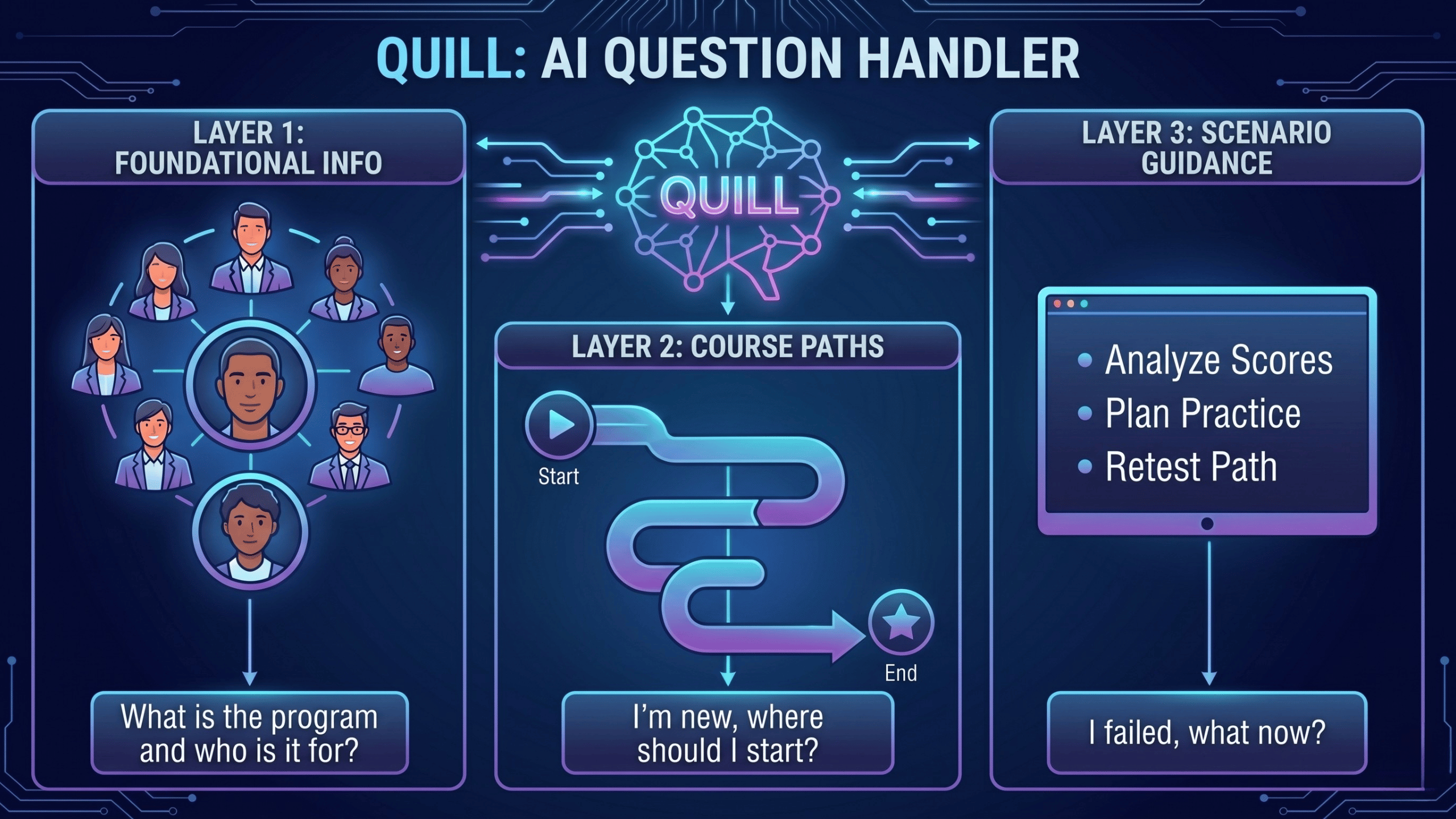
In practice, Quill handles questions across three layers:
- Foundational program information: “What is Realtime Voice Training and who is it for?”
- Course-path recommendations: “I'm new to court reporting – where should I start?”
- Scenario-specific guidance: “I failed my certification test – what do I do next?”
Multi-part questions are split and answered section by section. Because the assistant runs 24/7, a student studying at 11pm gets the same response time as one asking on a Tuesday afternoon.
Training approach:
Rather than a generic chatbot with generic answers, Quill was trained specifically on the Realtime Voice Training curriculum. Elizabeth worked with Charlene to collect:
- Course documentation and lesson plans
- Recorded class transcripts
- Past student email exchanges (anonymized)
- FAQ documents Charlene maintained for her team
Charlene also began identifying answers she had given in the Discord student community to feed into Quill's training corpus over time, so the assistant could eventually draw on the same patterns of explanation she used when answering students live.

Fallback and safety:
The assistant was designed with a conservative fallback. If a student asks something the model has not been trained on – for example, a highly specific dictation problem that requires diagnosing the student's individual setup – the chatbot does not guess. It directs the student to Charlene with a clear summary of what was asked.
This mattered to Charlene. She did not want students receiving wrong answers about technical skills that could set them back.

Results
Charlene tested Quill herself with real student questions before public launch, and “It gave me good answers.” She also expanded her engagement with MemberFix mid-build, a commitment that signaled confidence in the direction before launch.
In the first 7 days fully live, Quill handled 125 student messages from 37 students. The mix tracked the same categories Charlene had been answering manually for years: state certification and licensing (24%), software and tools like Eclipse and Speechmatics (17%), class and lesson navigation (17%), resources and materials (10%), and court reporting concepts like Federal Rule 30 and stipulations (4%).
The 3 to 4 hours a day Charlene used to spend on repetitive student email is the load Quill was built to absorb. Across a year, that comes to roughly 750 to 1,000 hours – four to six full working months spent on the same questions, asked over and over by different students at different stages.
What those reclaimed hours make possible is the work Charlene had already been forced to defer. The live Tuesday classes were due to be redone as pre-recorded modules so the session itself could become a Q&A lab. Four to five mini-courses and webinars on adjacent topics were sitting in her notes. Each project is a revenue line that Realtime Voice Training could not develop while Charlene's day was structured around email.
The change reaches students too. A question asked at 11pm gets answered immediately, without waiting for Charlene to clear her inbox. Faster answers mean less time stuck on a single roadblock and more time practicing the material the course is built around.
Quill four months after launch
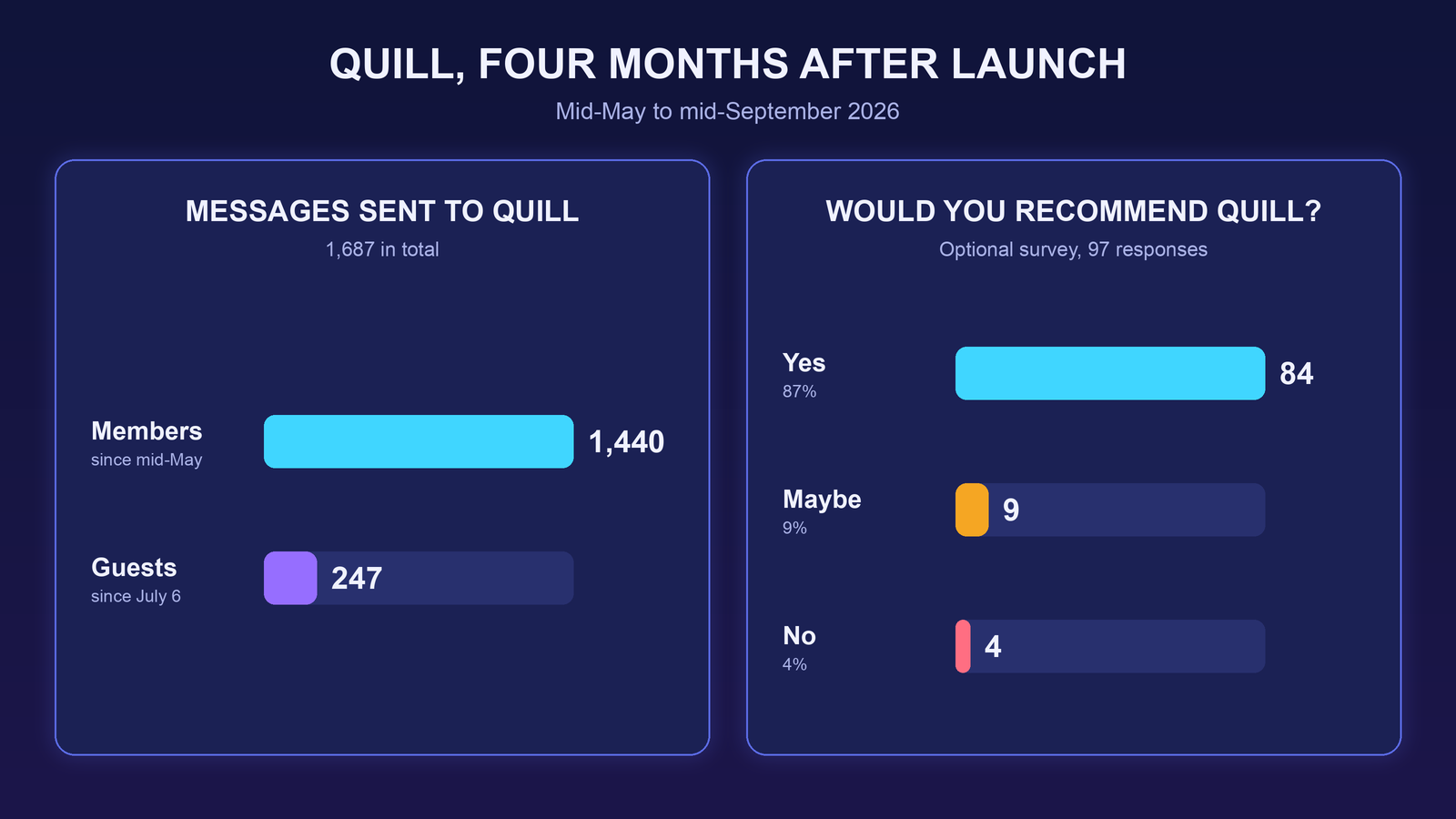
Quill went live in mid-May 2026. By mid-September, members had sent it 1,440 messages. On July 6 we added a guest mode, so people browsing the site without logging in can ask it questions too, and guests have sent another 247 messages since. Both versions get used every day, and we keep improving Quill as more real student questions come in.
Charlene told us Quill has virtually solved her email support, which used to take her 3 to 4 hours a day. Students got used to asking it first, and we estimate about 70% of the questions she used to get by email now go to Quill instead. She still answers some requests herself, like questions about information that isn't on the website, just far fewer of them.
We also set up an optional feedback survey. So far it has 97 responses: 84 say they would recommend Quill, 9 say maybe, and 4 say no. One response came with this comment:
“We talked about Quill in the practice group today and how much we appreciate it!”
Anonymous response, Quill feedback survey, September 2026
Running costs stay low, and so does the privacy risk. Quill runs on Google’s paid Gemini API tier, and the monthly usage bill has stayed under $30 so far. On the paid tier, Google’s terms say prompts and responses aren’t used to improve its products, so students’ questions and Charlene’s course material don’t end up training Google’s models.
Thinking about an assistant like Quill for your own site? See how we build AI chatbots for membership and course sites, including a calculator for what answering support by hand costs you.
When the founder is also the support desk, the inbox sets the agenda. Quill does not replace Charlene. It clears the operational layer so she can spend her day on the work students enrolled for.
Running a course where you're also the support desk?
Let's talk about getting repetitive questions off your plate.
 Reviewed by Vic Dorfman, founder of MemberFix, a WordPress membership expert with 10+ years building, fixing, and scaling membership sites.
Last reviewed September 2026.