

WordPress based membership sites have certain requirements, and make use of certain applications that, in my experience, makes most of the popular hosting providers a poor choice.
If you want to skip ahead and learn about our #1 recommendation for hosting your membership site, click HERE.
While there are plenty of excellent hosting providers out there that would work well for a regular (i.e., non-membership) website, most hosting companies don't give you a solid foundation for launching and growing a WordPress membership site without running into constant, annoying issues.
Let's look at some of the reasons for this.
The Core Problem: Most Hosts Can't Handle Concurrent Users
Before we dive into specific issues, let me name the fundamental problem that most hosting providers fail to solve: concurrency.
What is concurrency? It's the ability of your site to function well—without slowdowns, errors, or outages—even as more users interact with it simultaneously.
For a blog or brochure site, this isn't a major concern. Most visitors are consuming static content that can be easily cached and served.
But membership sites are different. When someone logs in, completes a lesson, takes a quiz, joins a community discussion, or makes a purchase, your server is doing actual work. Database queries fire. Sessions are managed. Progress is tracked. Transactions are processed.
Now multiply that by 50 members. Or 200. Or 500—all at once during a launch, a live event, or simply a busy Tuesday afternoon.
This is where most hosting providers fall apart. And it's why the advice you'll find in most “best WordPress hosting” articles doesn't apply to membership sites.
Aggressive Caching Breaks Membership Sites
Most web hosting companies that provide WordPress-specific hosting packages promise impressive page load times.
How can they make such a promise across the board despite the significant differences between various websites in terms of resource consumption, file and database sizes, traffic figures, tech stack, and other factors that influence page load times?
For example:
If I have a one-page website with only 2 plugins installed and 10 unique visitors per day, while you have a massive authority site with hundreds of pages, dozens of plugins, and thousands of visitors per day running a complex tech stack of 50 active plugins—is it possible to promise the same site speed improvements?
The answer is no.
But you can still achieve a significant improvement on most websites. Most hosting providers attempt to do this by using aggressive caching techniques on the server level.
By “server level,” I mean that the caching is activated by your hosting provider, not by a plugin inside your WordPress dashboard (such as WP-Rocket).
The problem with this approach is that server-level caching often breaks membership sites.
Specifically, caching on a membership website can result in:
– Content access issues (members seeing content they shouldn't, or not seeing content they should)
– Strange billing events
– Login/logout problems
– Session conflicts where one user sees another user's data
…and other seemingly inexplicable issues.
Furthermore, if you turn your caching OFF—assuming your hosting provider even gives you that option—you lose the main benefit that the hosting company promises you in the first place: increased site speed.
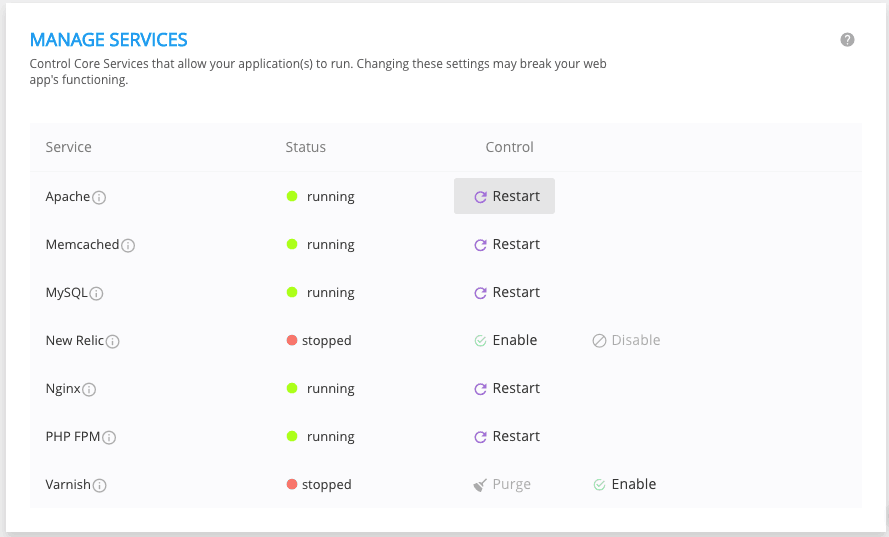
In a best-case scenario, caching is implemented as a series of performance improvement “layers.” This would be helpful because sometimes only one caching layer causes issues on your website (most typically the varnish cache).
If you could disable just that particular layer, you'd still be able to employ other layers such as Redis and OPCache.
Unfortunately, most managed WordPress hosting companies don't allow you to enable and disable individual caching layers. And even more critically, very few of these providers really understand membership site software the way we do, and therefore don't know how to optimize it.
In truth, you need to optimize performance on both the server side AND the WordPress side and understand how they work together. The most common suggestion you'll hear is to upgrade to a higher hosting plan, add more CPU cores, etc.
While there's certainly merit in allocating sufficient resources to your membership site, just throwing CPU cores at the problem is a great way to rack up a huge hosting bill while only making minor improvements to your site's performance.
What actually matters is the quality and configuration of those resources—high-frequency processors, intelligent caching that respects dynamic content, and proper scaling architecture.
Not Enough Caching Exclusions
Similarly, sometimes you only need certain posts or pages to be excluded from getting cached.
It makes sense that you'd want your forward-facing pages—sales pages, landing pages, blog, etc.—to receive the speed benefits of caching. Yet you want to exclude all system pages and member-facing pages (login, logout, my account, my profile, course progress, etc.) from being cached, as not doing so often results in conflicts.
Some hosting companies allow you to request caching exceptions from the support team. My experience with WPEngine (who I'm not picking on, but just using as a readily available example) is that they give you about 10 exceptions.
Too many exceptions negatively impact the performance of the server, which also hosts other customers' websites in addition to your own.
How likely is it that your membership site will have only 10 or fewer pages that need to be excluded from the cache? Pretty unlikely.
What you really need is the ability to exclude an unlimited amount of pages from getting cached, among other options—and a hosting provider that understands *why* this matters for membership sites.
The Transparency Problem in Hosting
One of the most frustrating aspects of working with large hosting providers is the lack of transparency around what you're actually getting.
Let me share a real example. Our CTO Denny had a chat with WPEngine support asking a simple question: “How many PHP workers does my site have allocated to it?”
The response was evasive at best:
> “Our numbers can change and are based on our proprietary queuing logic, which is not a clear cut ‘php worker' metric.”
When pressed further about how to understand if the site was saturating PHP worker limits, support transferred the chat to a “senior tech.” The eventual ticket response was:
> “Due to the dynamic nature of these optimizations, it's not feasible for us to provide you with the number of allocated PHP workers.”
In other words: we won't tell you what you're paying for.
This opacity is a feature, not a bug. When hosting providers can't or won't tell you what resources you have, you can't make informed decisions about whether you're getting value for money—or whether performance problems are caused by their infrastructure limitations versus issues on your site.
At MemberHost, we take the opposite approach. We're transparent about our infrastructure, our benchmarks, and our technical stack. If you ask us how your site is configured, we'll tell you. We believe transparency builds trust, and trust builds long-term partnerships.
Site Speed Is Chained to Caching (But It Doesn't Have to Be)
Let's recap:
One of the chief value propositions of many WordPress-focused hosting companies is faster load times for your websites. But they achieve this increased speed through aggressive caching.
While that would be fine for a non-membership site, this caching very often causes conflicts with WordPress membership plugins including MemberPress, LearnDash, BuddyBoss, WooCommerce, and others.
It's not surprising that heavy caching impacts most of the major membership plugins because caching *by its very nature* conflicts with the way membership plugins function. They're serving dynamic, personalized content that changes based on who's logged in and what they've done.
If you disable caching—if it's even an option—you fix the conflict. However, you lose the speed boost that you signed up for in the first place.
So why would you pay a premium for a hosting platform whose main benefit doesn't apply to your websites?
Exactly.
Thankfully, caching isn't the only factor that influences site speed. There are other important factors that matter even more for membership sites.
What Actually Matters for Membership Site Performance
CPU Power and Server Quality
This is the single biggest factor most hosting comparisons overlook.
For membership sites running transactionally heavy plugins like LearnDash, MemberPress, BuddyBoss, and WooCommerce, you need high-frequency processors—3GHz+ minimum—for optimal single-threaded PHP performance.
Why single-threaded? Because PHP processes requests one at a time. A faster CPU means each request completes quicker, freeing up capacity for the next one. Simply adding more CPU cores (which most hosts suggest when you complain about performance) doesn't help if each core is slow.
We use bare metal servers with NVMe SSD drives and high-speed networking. The result? Dramatically faster performance for the exact scenarios where membership sites struggle: wp-admin operations, course progress updates, checkout flows, and community interactions.
Server Configuration and Stack
It's not just about having fast hardware—it's about how that hardware is configured.
We use LiteSpeed Enterprise instead of the more common Nginx or Apache configurations. Combined with intelligent object caching (Redis), OPCache optimization, and surgical page caching that respects dynamic content, we can deliver speed improvements without breaking functionality.
For example: we've achieved 4x improvements in wp-admin load times for clients simply by implementing proper OPCache configuration. That's not just nice for site administrators—it matters for your team, your support staff, and anyone who interacts with your WordPress backend.
Server Location: A Nuanced Factor
Most hosting providers don't give you the ability to deploy your server in the geography of your choice. That's unfortunate because the closer your server is to your visitors' location, the faster your site will load for them.
However, I should be honest: this factor is less important than it used to be.
With modern CDN integration (we use Cloudflare), static assets are served from edge locations around the world regardless of where your origin server sits. The server location matters most for dynamic requests—the exact type of requests that membership sites generate constantly.
So yes, server location helps, but it's secondary to CPU power, server configuration, and proper caching strategy. If you can only optimize one thing, focus on the fundamentals first.
Scaling Without Arbitrary Limits
Here's where most hosting providers punish you for success.
When your site starts to do really well and gets lots of members, that's when you typically start to see WordPress errors (400, 500), major slowdowns (1 minute to load wp-admin…), and outages.
That's because once you reach a particular threshold of concurrent users, your server can't handle the load. Standard hosting either chokes under the pressure or hits you with overage charges.
We configure both vertical scaling (your server can scale up dynamically from 2vCPU to 16vCPU as needed) and horizontal scaling (clustered environments for true load distribution). Real-time auto-balancing prevents any single server from getting overloaded.
No arbitrary traffic limits. No overage charges. No crashes when it counts.
Security: Taking It Seriously Without Taking Advantage
Security is an often misunderstood subject simply because most people don't understand it. This creates a situation where many companies take unfair advantage of people who don't know any better.
Because the very mention of a hacked site strikes instant fear into the hearts of website owners everywhere, it becomes incredibly easy to sell somebody a service that they don't actually need.
The Bluehost Malware Situation
One experience with Bluehost illustrates this point. Their malware scanners identified an infected file on a customer's website and immediately shut down their entire server.
All of my customer's websites, which collectively generate thousands of dollars in sales per day, were shut down on the basis of an alleged malware infection.
When we contacted Bluehost support, they insisted on a $250 fee to clean up the hack. But they were reluctant to disclose where the supposedly hacked file was located.
After some persistence, we got the information and had our malware removal specialist investigate. The file in question was not malware—it was a licensing file with obfuscated code.
We contacted Bluehost support, and they reinstated the websites. But shortly after, the same situation repeated.
The fundamental issue: Most larger hosting companies use automated malware scanning scripts which often return false positives. The company then leverages the situation to upsell security services—even when no actual problem exists.
The pattern is clear: shut down your site on the basis of an alleged hack, refuse to provide complete information, demand payment to resolve the problem (even if there isn't one), and hold your sites hostage until you do.
The SiteLock Pattern
SiteLock is a malware scanning and removal company that partners with many hosting providers. I've observed a similar pattern with them.
After we moved a customer from GoDaddy to our hosting platform, she received a message from SiteLock (which she had active on her previous GoDaddy account) alleging malware on her website and recommending their paid services.
The problem: The website files and databases were already on our hosting platform, and the DNS was pointing to us too. Any alleged vulnerability was a non-issue because we'd already cleaned and hardened the site.
When we pointed this out, they claimed some DNS records still pointed to GoDaddy and this represented a vulnerability. But the only DNS records that matter in this instance are the A Record and the CNAME, which were both pointed to our account. The other records were legacy records that cannot cause or permit a hack.
Our malware removal specialist confirmed that the “cross-scripting vulnerability” they cited wasn't even a real vulnerability in this context.
SiteLock then graciously suggested installing their app on our servers. We declined.
The Truth About WordPress Security
WordPress website security is actually a straightforward matter that consists of a few fundamental truths:
1. It's impossible to completely prevent malware/hacks. Anyone who promises otherwise is overselling.
2. Keep your software updated. Un-updated plugins and themes represent one of the largest security vulnerabilities in WordPress, even if they're deactivated. Deactivate and delete all plugins and themes that you aren't using. (MemberFix can do this for you via our Managed Tech Ops service.)
3. Follow WordPress security best practices. Strong passwords, limited login attempts, two-factor authentication, regular backups.
4. Work with providers who are transparent about security. Good security is largely a matter of preventative maintenance. But if your site does get hacked, your hosting provider should handle it promptly and it shouldn't cost you an arm and a leg.
At MemberHost, we layer Cloudflare, LiteSpeed WAF, and BitNinja for comprehensive protection. If something does go wrong, we handle it—without holding your site hostage.
Best Membership Site Hosting: The Final Verdict
I have 2 recommendations depending on where you're at.
If You're Just Starting Out
If you're just getting started with your membership site, don't have paying members, or you're still validating your business concept, CloudWays is a solid entry-level option.
CloudWays essentially provides a user-friendly bridge between top cloud hosting providers (Amazon, Vultr, Digital Ocean) and average end users like you and me. You get good performance at a reasonable price while you're building.
Be aware that CloudWays doesn't offer the same hand-holding experience you may be used to with other hosting providers. Their support is helpful, but the product itself is closer to the metal—you'll need to be more technically proficient than if you were on a fully managed platform.
CloudWays has no cPanel, no built-in email server, no SMTP email, no file manager, no DNS manager. With more power and flexibility comes more responsibility.
For getting started? It works. For a serious membership site with real revenue? You'll outgrow it.
If You Already Have a Live Site with Members
If you need reliable performance for your WordPress membership site—especially if you're running a “transactionally heavy” tech stack with plugins like MemberPress, LearnDash, BuddyBoss, WooCommerce, GamiPress, etc.—MemberHost is your best choice.
And it's not just a matter of opinion. We consistently outperform competitors in performance testing and load testing benchmarks.
What makes MemberHost different:
We understand concurrency. In a load test with 500 virtual users (each visiting the homepage, shop page, adding products to cart, and checking out at a rate of 1 page/second over 10 minutes), we completed the test with zero timeouts or failures, achieving a max throughput of 22 checkouts per second. That's equivalent to over 79,000 checkouts per hour—on a single-node environment without clustering.
We don't punish you for success. When your site finally starts kicking ass, making money, and helping people en masse, that's exactly when most hosting providers crash and burn. MemberHost's ability to handle concurrent users and scale seamlessly without errors or slowdowns is our biggest differentiator.
We're transparent. We don't hide our tech stack behind “proprietary optimizations.” Ask us what resources you have, and we'll tell you. Ask us to explain a performance issue, and we'll dig in with you.
We understand WordPress. Before starting MemberHost, our primary business was (and still is) setting up and supporting WordPress membership sites through MemberFix. We've spent over a decade working with membership and LMS platforms. We know the plugin ecosystem, the common failure points, and how to optimize for real-world usage—not just synthetic benchmarks.
Who trusts us: We host membership sites for organizations including Echelon Front (Jocko Willink's leadership training company), TechServe Alliance, and MDBA, among many others.
Don't You Have Better Things to Do?
I don't think busy business owners should be dealing with hosting “stuff” at all.
Don't you have better things to do than configure DNS, troubleshoot email, manage FTP, and whatever else?
Of course you do.
You need a site that runs and runs well—and ideally gives you a competitive advantage because your site is faster and more reliable than your competitors'.
Faster site = better rankings in Google, improved conversions, better user experience.
More reliable site = much lower chance that something catastrophic happens to the “home” where your business lives online.
Managed-for-you = you can focus on the work that actually moves the needle for your business and forget about hosting concerns knowing that professionals are handling it.
Want to See How We Compare?
Want to see how our WordPress membership site hosting stacks up to your current provider?
Fill out and submit the form below and we'll do a free performance comparison. No pressure or gimmicks. Just data to help you make the right decision for your business.
A Note on Bundling and Focus
When I was building a podcast production service years ago (now defunct), I learned an important lesson about bundling.
I was offering an all-inclusive, done-for-you service where I would edit your podcast, transcribe it, write a blog post about it, post on social media, write your broadcast email, etc.
But as it turned out, people only really cared about editing and (to a lesser degree) transcription. All of the other services I'd bundled together were pretty much worthless to my prospective customers, and served merely to raise the price and dilute my offer.
This lesson applies to hosting too. Many “managed WordPress hosting” packages bundle features you don't need while failing to deliver on the one thing that matters: reliable performance for your specific use case.
At MemberHost, we focus on what membership site owners actually need: the ability to handle concurrent users without errors, outages, or arbitrary limits. Everything else is secondary.
One thing I forgot to mention: MemberHost was born out of necessity. My primary business, MemberFix, sets up and supports WordPress membership sites. We created MemberHost because no existing hosting company addressed the unique technical challenges that membership site owners face—the ability to scale seamlessly, handle large numbers of concurrent users, and run plugin-heavy sites without constant issues.
When we first conceived the idea for MemberHost, it was to give our own websites and our clients' sites a competitive advantage. We quickly realized we could offer that same advantage to others.
We treat our customers' websites as if they were our own, and we consider our customers to be partners—not tickets in a queue.
That approach has served us and our customers well.
About the Author: Vic Dorfman is the founder of MemberFix, a WordPress technical services agency specializing in membership, eLearning, and community sites since 2014. MemberFix has worked on 1,000+ membership sites and provides ongoing Managed Tech Ops services to organizations including Echelon Front, TechServe Alliance, and MDBA. Learn more about MemberFix



8 Responses
Hi Vic,
I read every word of your article and I feel you are bold and very like-minded to me.
I’ll get back to you via eMail for further information. GREAT!
Awesome Michael! Look forward to chatting. 🙂
Hi Vic,
Just wondering what’s your opinion on Flywheel and those a few you mentioned together with Flywheel but did not make further comments on? Are they any good? For a new membership site with no members and a first time administrator, according to this review, I can consider Media Temple. But how do I choose which plan to sign up for? What to consider ? Thank you very much for this honest review.
Hi Ed,
Thanks for reading and leaving your comment!
1. My experience with Flywheel in particular is a bit limited.
But I’ve just double-checked their landing page and they seem to present the same problems as most managed WP hosting companies. Namely:
A) Aggressive caching on the server level.
B) They disallow the use of certain plugins and scripts (https://getflywheel.com/wordpress-support/what-plugins-are-not-allowed/)
Plus, their pricing is pretty high if you ask me. $25 for only 1 WordPress install and a cap on max monthly visitors? I’ll pass.
If CloudWays is a bit too hands-on for you and you’d like a more managed solution with a higher degree of support and ‘done-for-you’, then you’d be better off going with SiteGround’s GoGeek plan which is currently $12/mo for multiple websites and a 100k visitors (plus excellent support in my experience).
Our affiliate links if you’d like to use them:
CloudWays: https://memberfix.rocks/cloudways
SiteGround: https://memberfix.rocks/go/siteground
Best,
Vic
Hi Vic,
Thank you for the reply. I really appreciate that.
1) A bit confusing here… this review dedicated a section specifically describing the problems of SiteGround hosting and recommended Media Temple for someone just starting out and not tech savvy, but you recommend SG here instead of MT, may I ask why?
2) You also mentioned “most of my personal sites and customer’s sites are hosted with either AWS (Amazon Web Services), Vultr, or Digital Ocean.”
So I assume that means we can also host our website with these providers and that probably requires being tech savvy, correct? What’s the differences between hosting with them directly vs with the hosting companies we as end users are more familiar with?
Thank you again.
Best regards,
Ed
Hi Ed,
Thanks for your clarifying comment!
I didn’t quite realize it but I can see now how my reply seems to contradict the article.
The fact is that I wrote the article a while back.
Even though the “Last Updated” date is from a few months ago, I wrote the bulk of the content over a year ago.
# As to your questions… #
1. What I’ve found with SiteGround is that their cheapest plan is really crappy.
They basically use it—it seems to me—as a way to acquire customers. What winds up happening is that you almost immediately run into resource limitations, at which point SiteGround pitches you on one of their higher plans.
This is a bit on the sneaky side because I’ve seen customers install blank WordPress sites on the low SG plan and immediately get a notification that they’ve exceeded their allowed resources quota.
Obviously, nobody can run a site if even a single blank WP install triggers resource starvation. So there’s bit of disingenuous marketing happening here as far as I can tell.
However, if you go directly to their GoGeek plan (which is still very affordable), it’s quite good as far as shared hosting goes, especially if you want to have multiple websites, save some money, get the familiar cPanel experience, and get good support.
It also takes quite a bit more to run up on any resource limitations on the GoGeek plan.
MediaTemple is still a good option but in the past year or so I’ve had a lot more experience with SiteGround so I feel more comfortable recommending them (the GoGeek plan in particular) as I have more data across multiple customers to suggest it’s quite good as far as a shared hosting.
2. When I say that most of our sites and our customers’ sites are hosted with DigitalOcean, Vultr, and AWS, what I mean is that they’re all hosted on those infrastructures via CloudWays.
So our preferred hosting platform is CloudWays, which is basically just a reseller of cloud hosting from the major providers like AWS, Vultr, DigitalOcean, and Google Cloud.
The problem with going to those providers directly is that the setup and maintenance is very technically demanding. Whereas CloudWays adds a user friendly, easy to understand software layer between you and the end provider.
So in essence you get the power, flexibility and performance of a major cloud hosting provider and the user friendliness of a more conventional hosting company.
CloudWays isn’t quite as fool proof as something like SiteGround but I think the quality of hosting you get for the money is unbeatable if you’ve got a technical bent and don’t mind getting your hands a bit dirty (or in our case, have a team of pros to do it for you! 🙂
Hope that helps!
Best,
Vic
Hi Vic,
Thank you for the clarification on SiteGround.
1) You mentioned CloudWays can be more technically demanding, so is it possible for a non-developer user to learn how to use it ?
2) Your SpeedKills.io is a hosting service and MemberFix is only for problem solving, correct? Does SpeedKills.io also include problem solving?
3) This last one is not shop-talk. I told a friend of mine, Mike, that I met at a workshop about this article. Mike’s also building a WordPress membership site and he’s also interested in moving to Asia, Thailand or China, to be specific. And wondered if he can contact you via your Contact form to chat with you about your experiences of living in Thailand.
Thank you.
Best,
Ed
Hi Ed,
1. Yes it’s perfectly possible to figure out how to use CloudWays as a non-developer.
It’s not that techie, it’s just a bit different than you might be used to if you’re coming from the cPanel world. But it’s quite intuitive, and actually I prefer it (as a non-dev myself).
When I say techie I’m referring more to the fact that you have more control over your server and application in CloudWays like the various caching layers for example. But CW also has a substantial knowledge base that explains each of those features so you’ll be able to figure it out. 🙂
2. SpeedKills.io is a hosting service, yes.
It’s basically CloudWays with a proactive management / updating service on top. The only problem solving we do in SpeedKills.io is if you need support on your server or application having to do with the hosting itself.
MemberFix is our full fledged tech support service for problem solving, setting things up (like membership sites), working with various apps, integrations, etc.
3. Sure.