

The Problem
You have a product on your WooCommerce website or store, and you do not want your customers to be able to purchase that product more than once.
The Solution
All you need to do is add a custom function to your theme.
Here's what you'll need:
- WordPress Website.
- WooCommerce Plugin installed.
- My Custom Functions Plugin installed.
Installing and Activating “My Custom Functions” Plugin
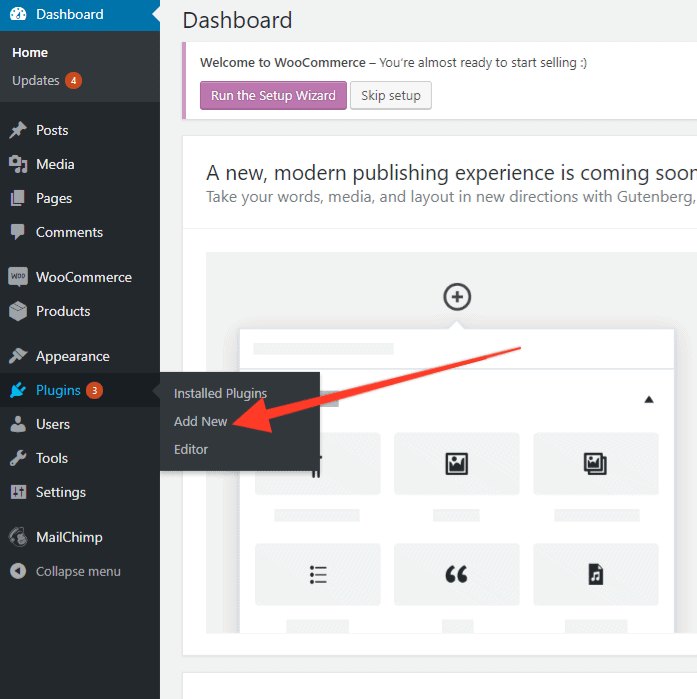
1 – In your WordPress Dashboard navigate to Plugins and click Add New.
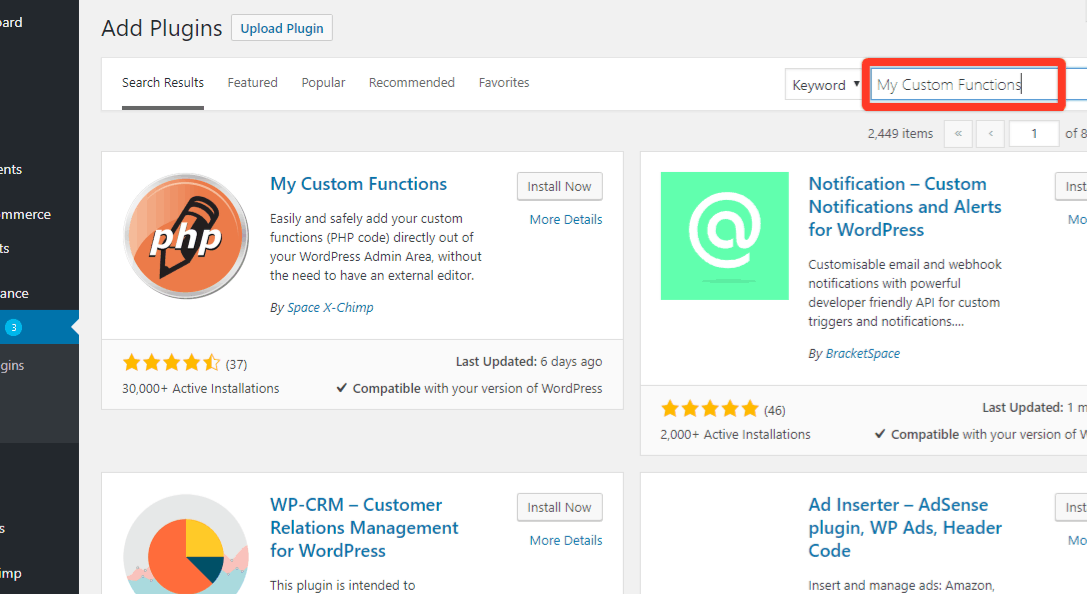
2 – Search for “My Custom Functions” Plugin.
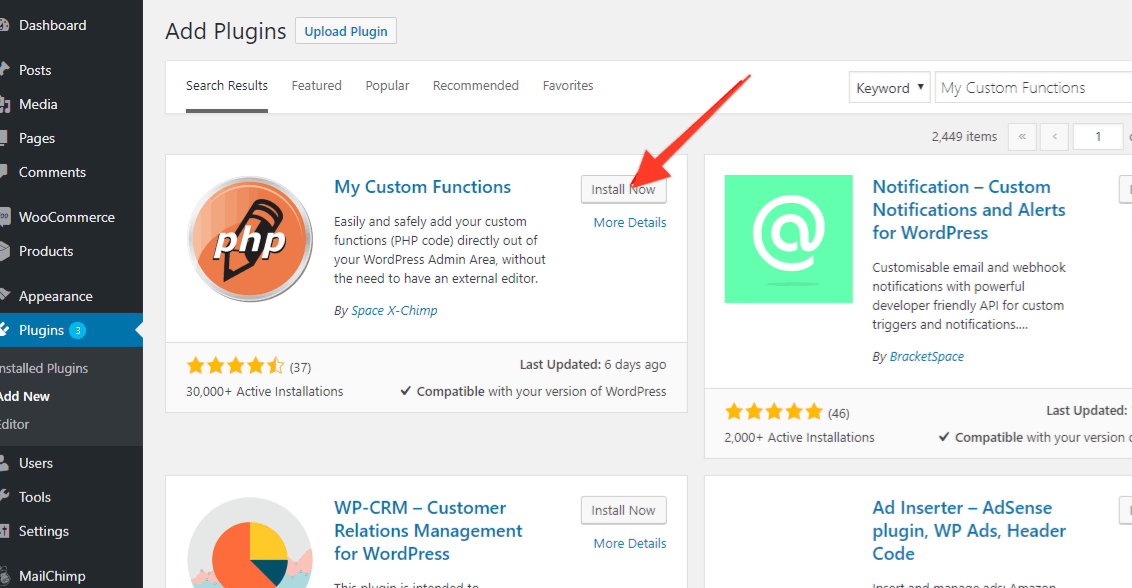
3 – Locate My Custom Functions plugin and click Install Now.
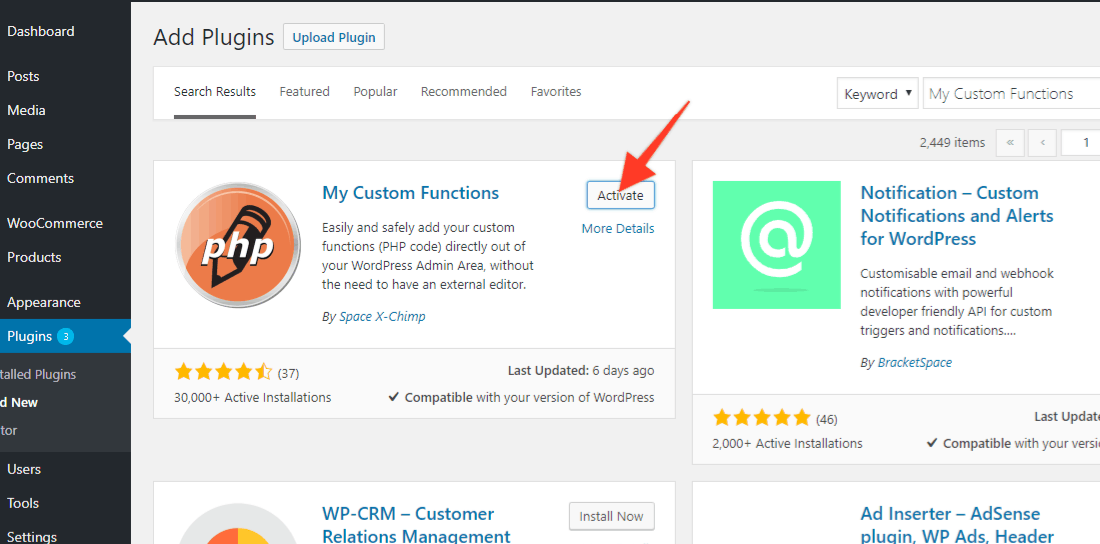
4 – Click Activate.
Adding a Function
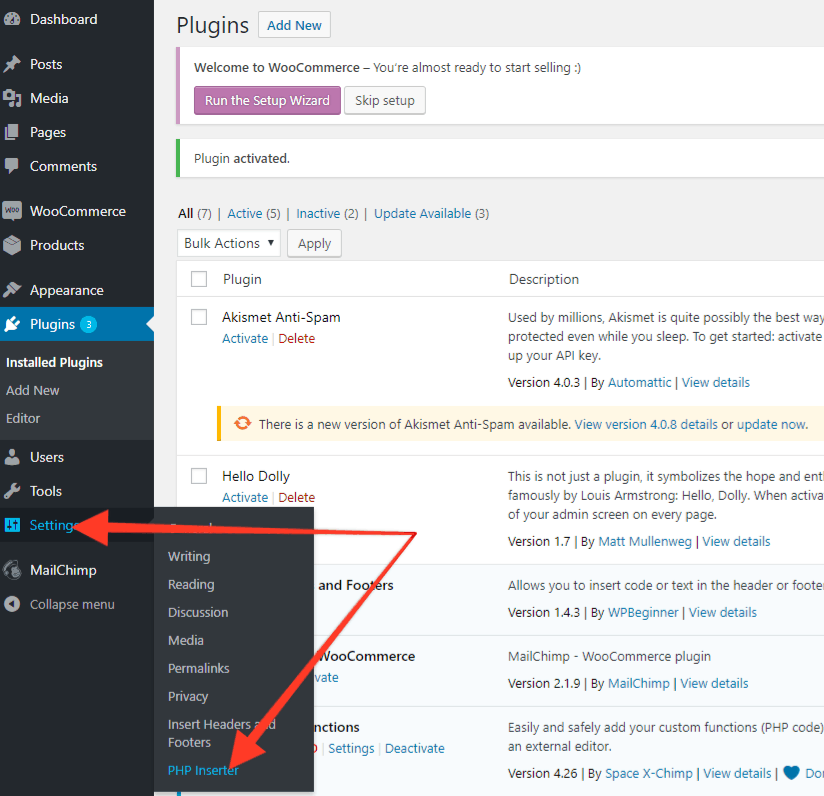
1 – After successful installation, navigate to Settings => PHP Inserter.
2 – Paste this code:
| /** | |
| * Disables repeat purchase for products / variations | |
| * | |
| * @param bool $purchasable true if product can be purchased | |
| * @param \WC_Product $product the WooCommerce product | |
| * @return bool $purchasable the updated is_purchasable check | |
| */ | |
| function sv_disable_repeat_purchase( $purchasable, $product ) { | |
| // Don't run on parents of variations, | |
| // function will already check variations separately | |
| if ( $product->is_type( ‘variable‘ ) ) { | |
| return $purchasable; | |
| } | |
| // Get the ID for the current product (passed in) | |
| $product_id = $product->is_type( ‘variation‘ ) ? $product->variation_id : $product->id; | |
| // return false if the customer has bought the product / variation | |
| if ( wc_customer_bought_product( wp_get_current_user()->user_email, get_current_user_id(), $product_id ) ) { | |
| $purchasable = false; | |
| } | |
| // Double-check for variations: if parent is not purchasable, then variation is not | |
| if ( $purchasable && $product->is_type( ‘variation‘ ) ) { | |
| $purchasable = $product->parent->is_purchasable(); | |
| } | |
| return $purchasable; | |
| } | |
| add_filter( ‘woocommerce_is_purchasable‘, ‘sv_disable_repeat_purchase‘, 10, 2 ); | |
| /** | |
| * Shows a “purchase disabled” message to the customer | |
| */ | |
| function sv_purchase_disabled_message() { | |
| // Get the current product to see if it has been purchased | |
| global $product; | |
| if ( $product->is_type( ‘variable‘ ) ) { | |
| foreach ( $product->get_children() as $variation_id ) { | |
| // Render the purchase restricted message if it has been purchased | |
| if ( wc_customer_bought_product( wp_get_current_user()->user_email, get_current_user_id(), $variation_id ) ) { | |
| sv_render_variation_non_purchasable_message( $product, $variation_id ); | |
| } | |
| } | |
| } else { | |
| if ( wc_customer_bought_product( wp_get_current_user()->user_email, get_current_user_id(), $product->id ) ) { | |
| echo ‘<div class=”woocommerce”><div class=”woocommerce-info wc-nonpurchasable-message”>You\'ve already purchased this product! It can only be purchased once.</div></div>‘; | |
| } | |
| } | |
| } | |
| add_action( ‘woocommerce_single_product_summary‘, ‘sv_purchase_disabled_message‘, 31 ); | |
| /** | |
| * Generates a “purchase disabled” message to the customer for specific variations | |
| * | |
| * @param \WC_Product $product the WooCommerce product | |
| * @param int $no_repeats_id the id of the non-purchasable product | |
| */ | |
| function sv_render_variation_non_purchasable_message( $product, $no_repeats_id ) { | |
| // Double-check we're looking at a variable product | |
| if ( $product->is_type( ‘variable‘ ) && $product->has_child() ) { | |
| $variation_purchasable = true; | |
| foreach ( $product->get_available_variations() as $variation ) { | |
| // only show this message for non-purchasable variations matching our ID | |
| if ( $no_repeats_id === $variation[‘variation_id‘] ) { | |
| $variation_purchasable = false; | |
| echo ‘<div class=”woocommerce”><div class=”woocommerce-info wc-nonpurchasable-message js-variation-‘ . sanitize_html_class( $variation[‘variation_id‘] ) . ‘“>You\'ve already purchased this product! It can only be purchased once.</div></div>‘; | |
| } | |
| } | |
| } | |
| if ( ! $variation_purchasable ) { | |
| wc_enqueue_js(“ | |
| jQuery(‘.variations_form') | |
| .on( ‘woocommerce_variation_select_change', function( event ) { | |
| jQuery(‘.wc-nonpurchasable-message').hide(); | |
| }) | |
| .on( ‘found_variation', function( event, variation ) { | |
| jQuery(‘.wc-nonpurchasable-message').hide(); | |
| if ( ! variation.is_purchasable ) { | |
| jQuery( ‘.wc-nonpurchasable-message.js-variation-‘ + variation.variation_id ).show(); | |
| } | |
| }) | |
| .find( ‘.variations select' ).change(); | |
| “); | |
| } | |
| } | |
| add_action(‘init', ‘only_one_login'); |
Here:
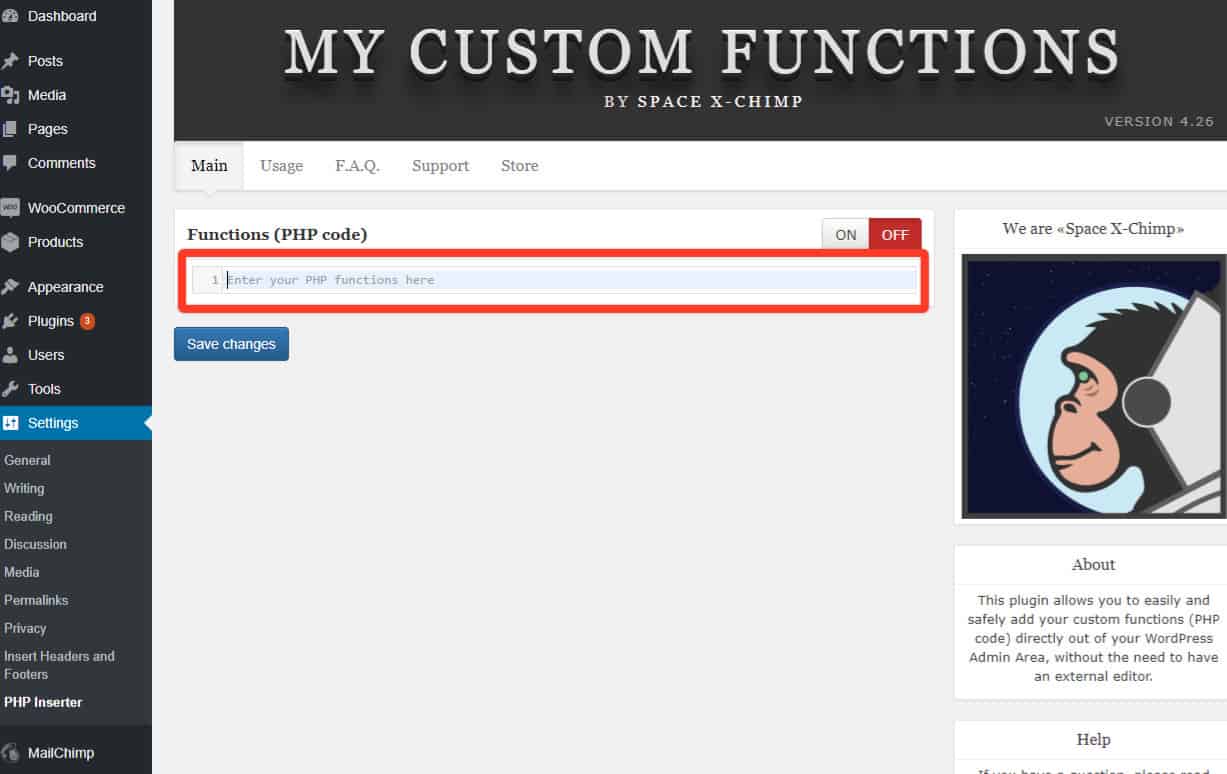
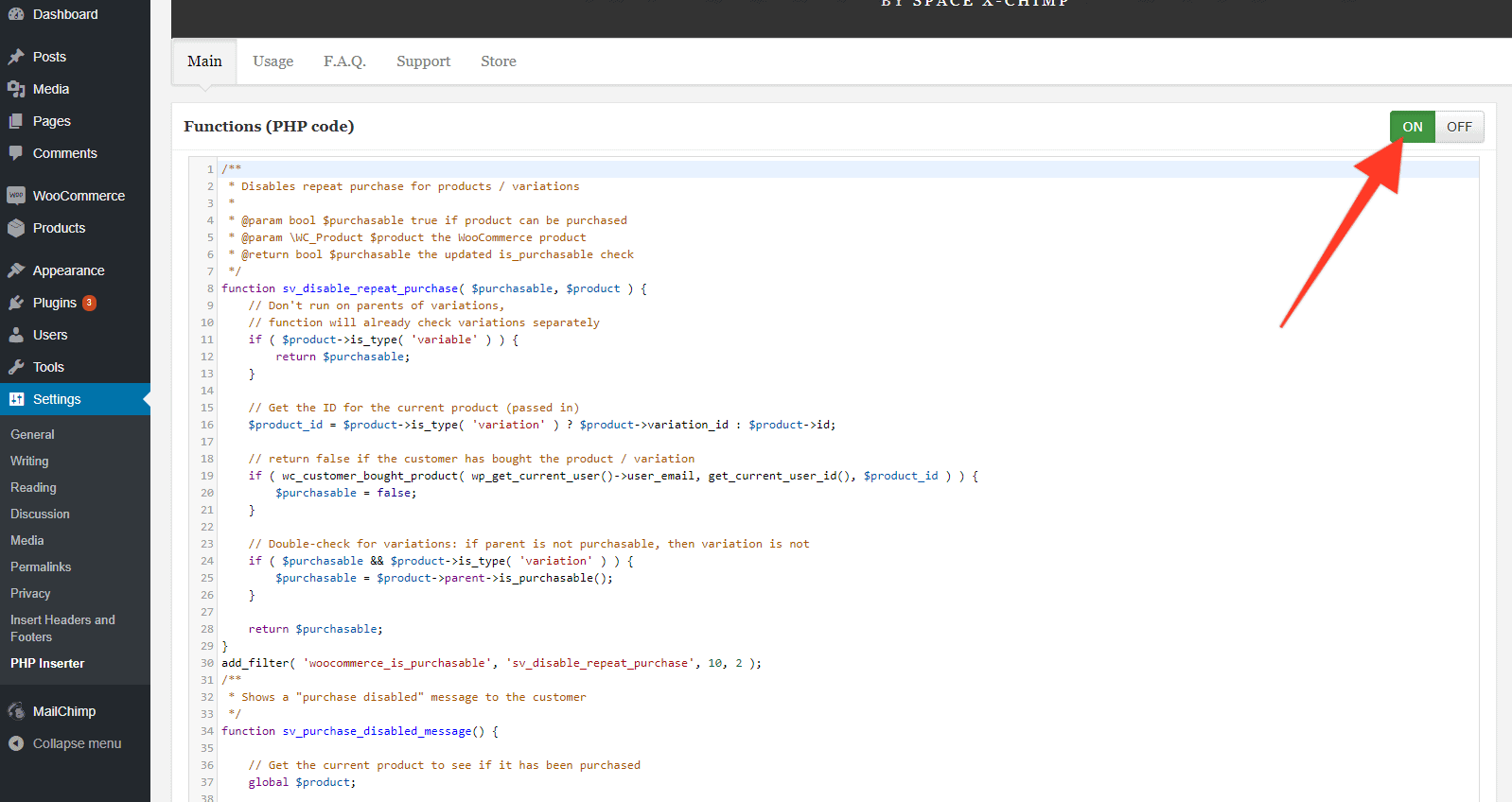
3 – Click “ON” button.
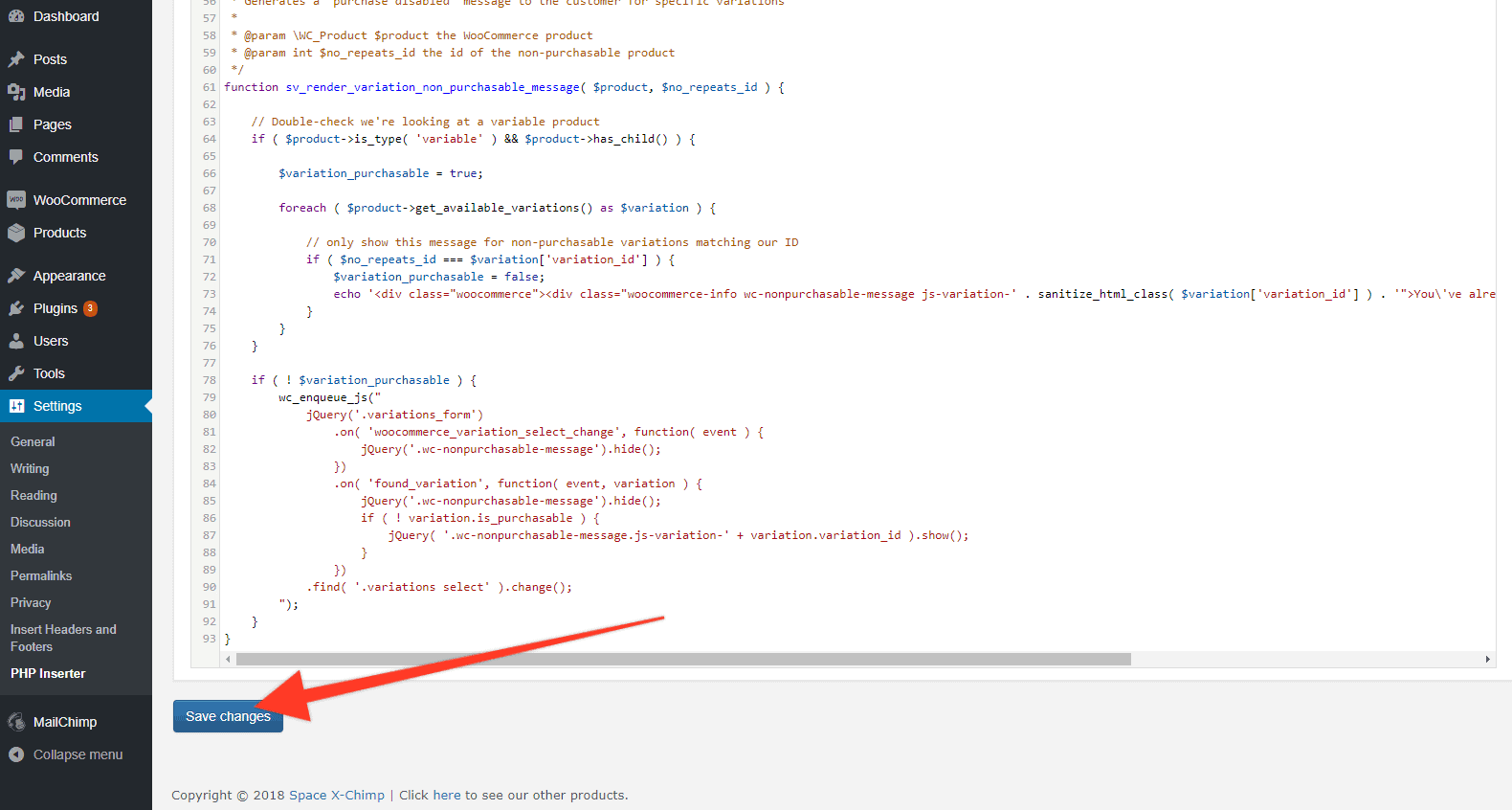
4 – Click “Save Changes” button.
That's it! You have successfully implemented a function in WooCommerce that prevents users from buying a product more than once.


7 Responses
I want to enable this for only certain products (better if category), not all. Will this do the job?
Thanks.
Hi Shekhar,
Unfortunately, this snippet can’t do that. It was built to apply to all the products.
We could customize that for you, if you are interested in that customization, here you have a link to our service page:
https://memberfix.rocks/memberfix/
Thanks!
Sorin
i did it and worpress just crash i almost loose my page
I think you have a little issue in the code, the last 2 lines.
this:
Hello Francisco,
Thank you, that’s correct. You need to remove the last “}” symbol.
Help this crashed my site. Don’t know how to get it back!
Hello Ivan,
Sorry for such a late reply. If it still actual: first of all, you need to disable the plugin using FTP or file manager.
To do it you need to navigate to ‘yourwordpresswebsite/wp-content/plugins’ directory and disable the necessary plugin by renaming its folder.
Then you need to fix the script removing the last “}” symbol.